

The brands consistently winning on Google Shopping are not the ones with the biggest budgets.
They are the ones with the cleanest product data, the tightest feed architecture, and a clear understanding of how Shopping campaigns fit into their broader acquisition economics.
That last part is where most optimization guides miss the point entirely. They tell you to add GTINs and write better product titles. Those things matter.
But they are tactical inputs to a strategic question: How do you build a Google Shopping presence that reliably generates profitable orders, at a cost per acquisition that supports your margin structure, and that scales without deteriorating efficiency?
That is what this guide is designed to answer.
Understanding Google Shopping: Why the Distinction Matters
Google Shopping is not simply a paid advertising format. It operates across two distinct surfaces with different mechanics, different cost structures, and different optimization levers.
The paid layer, Shopping Ads, runs through Google Ads and surfaces product listings in response to search queries. You bid, you pay per click, and your products appear when your bid and product data are more relevant than competing listings in the auction.
The organic layer, free product listings, surfaces in Google Merchant Center and can place your products across Google Search, the Shopping tab, Google Images, and Google Lens at no per-click cost. Many brands are fully unaware they have organic exposure through this channel, and correspondingly, many are unknowingly leaving free traffic on the table because their feed quality is too poor to earn those placements.
Understanding this distinction matters for budget allocation. A well-optimized feed serves both surfaces simultaneously.
The investment in feed quality delivers dividends in paid-auction efficiency and organic placement coverage.
How to Set Up Google Merchant Center in India
For businesses new to Google Shopping, the setup sequence matters. Here is the process:
- Create a Merchant Center account at merchants.google.com. Select India as your country of sale and set your currency to INR.
- Verify and claim your website by adding a meta tag to your homepage, uploading an HTML file, or using Google Tag Manager. Claiming confirms you own the domain.
- Configure your business information - shipping settings for India (carriers, rates, delivery times), return policy, and tax settings.
- Create your product feed. You can do this manually via Google Sheets, via a scheduled fetch from your site, or via API. Most e-commerce platforms (Shopify, WooCommerce, Magento) have direct Merchant Center integrations.
- Link Merchant Center to Google Ads to enable paid Shopping campaigns. This is done from the Merchant Center "Linked accounts" section.
- Submit and monitor for approval. After submission, most products are reviewed within 3-5 business days. Check the Diagnostics tab daily during launch - feed errors and disapprovals surface here.
The most common setup mistakes are misconfigured shipping settings (which cause disapprovals), mismatched prices between feed and website (a policy violation), and images that are too small or contain watermarks.
The Architecture Behind Every Shopping Campaign
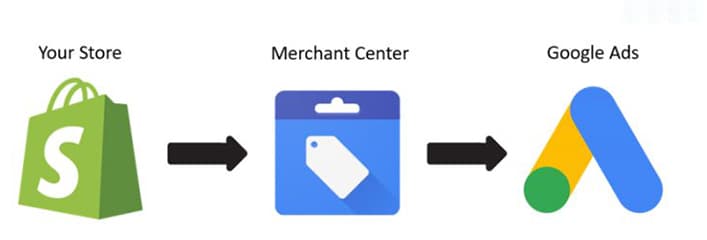
Google Shopping operates through the integration of two systems: Google Merchant Center and Google Ads. Getting clear on the role of each prevents the most common setup errors.
Google Merchant Center is where your product data lives. You submit a product feed, either manually, through a scheduled fetch, or via API, that contains all the attributes Google uses to understand what you sell and match it to relevant queries.
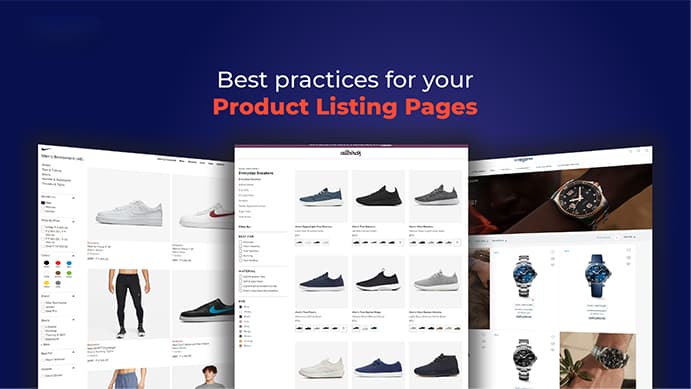
The quality of that feed directly determines where your ads appear, how frequently they appear, and what your cost per click looks like.
Google Ads is where your bidding strategy, campaign structure, budget allocation, and targeting settings live. It reads from the Merchant Center feed and uses that data to generate ads. You do not write ad copy for Shopping campaigns the way you do for Search.
The product title, image, price, and seller information are pulled directly from your feed. This is why feed quality is not a secondary concern; it is the primary creative and relevance input.
Performance Max vs. Standard Shopping: Which to Use
Performance Max (PMax) is now Google's default campaign type for Shopping, but the choice between PMax and Standard Shopping depends on where your account is in its maturity.
Use Standard Shopping when:
- Your account has fewer than 30 conversions per month from Shopping
- You want direct control over product group bidding and campaign segmentation
- You are testing a new product category with limited historical data
Use Performance Max when:
- You have at least 30-50 monthly Shopping conversions
- You want Google's automation to optimize across its full ad inventory (Search, Shopping, YouTube, Display, Gmail)
- You have strong conversion tracking and sufficient historical data to feed the algorithm
The common mistake is switching to PMax too early. Without sufficient conversion history, the algorithm lacks the signal to optimize efficiently and often underperforms Standard Shopping in early stages. Start with Standard Shopping, build conversion data, then graduate to PMax once the data volume supports it.
Why Feed Optimization Drives Google Shopping Revenue
Ask most e-commerce marketing teams where they focus their Google Shopping optimization effort. The answer is usually bidding strategy, campaign structure, or budget allocation.
Those factors matter. But the largest untapped gains in most accounts sit in the product feed itself.
Here is why: Google's algorithm uses your product data to match your listings to user queries.

If your titles, categories, and descriptions are imprecise, your ads show for irrelevant queries, CTR drops, Quality Score declines, and CPCs increase. The algorithm is penalizing you for bad data, not for bad bidding.
Product Titles
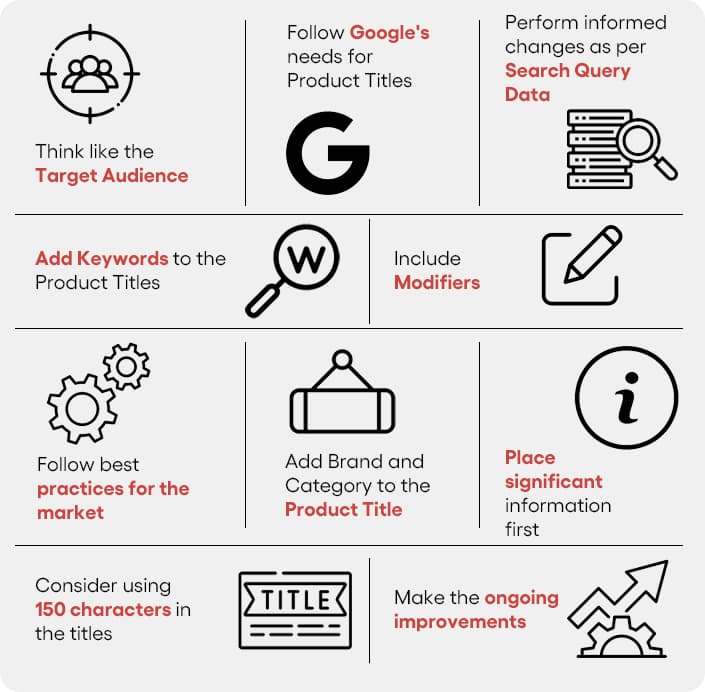
The product title is the most consequential attribute in your feed. It functions as both a relevance signal and a match vehicle. Google reads the title to understand what query your product should match.
A strong product title front-loads the attributes that matter most for your category. For apparel, that is typically: brand, product type, gender, size, color, and material. For electronics: brand, product name, model number, key spec. For consumables: brand, product type, quantity, and variant.
The mistake most brands make is pulling product titles directly from their CMS or ERP, where titles are written for internal catalog management rather than search intent. "Blue Running Shoe M12" is a warehouse-friendly title. "Men's Lightweight Trail Running Shoes, Size 12, Blue, Breathable Mesh" is a Shopping-optimized title. These are not equivalent in terms of auction performance.
Product Categories
Google's product taxonomy contains over 6,000 categories.
The default behavior for brands that have not deliberately mapped their products is to land in broad, high-competition parent categories, where your listings compete against every adjacent product type in the category.
The value of granular categorization is twofold:
- It improves relevance matching to specific queries.
- It reduces the noise in your performance data by creating cleaner segmentation for analysis.
If you sell both hiking boots and trail running shoes sitting in the same "Athletic Footwear" parent category, you cannot easily diagnose performance differences between them.
Take the time to map every product to the most specific applicable leaf-level category. For most brands, this is a one-time exercise that pays ongoing dividends.

GTINs and Product Identifiers
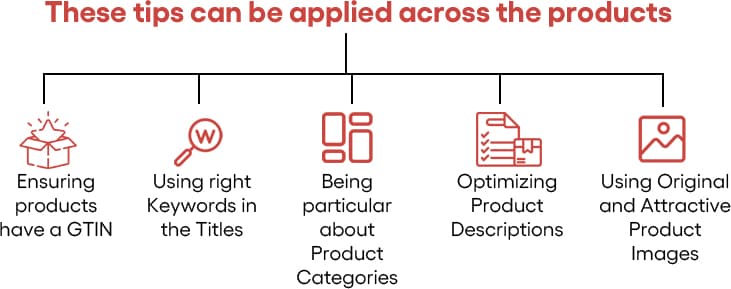
Global Trade Item Numbers allow Google to match your product to its own product knowledge graph. When Google recognizes a GTIN, it can pull in structured product data, pricing comparisons, reviews, and rich information that improves how your listing renders and competes.
For branded resellers and retailers, GTINs are not optional.
Google's algorithm deprioritizes listings without valid product identifiers in competitive categories. If you are selling products with available GTINs and not including them, you are conceding visibility to competitors who are.
For private label or custom products without GTINs, the identifier_exists attribute should be set correctly to avoid feed warnings.
Product Images
Image quality in Shopping is a conversion variable, not just a creative preference.
Your main image is visible in the listing before the click happens. Poor image quality signals product quality to the shopper, regardless of what the product actually is.
Use clean, white-background main images at a minimum of 800×800 pixels. For lifestyle and contextual shots, use the additional_image_link attribute to include supplementary images that appear on the product detail page within Shopping.
Alt text on product images carries SEO value for organic Shopping placement. It should accurately describe the product with relevant attributes, not generic placeholder text. For more on image optimization best practices including alt text, see our image SEO guide.

If your Google Shopping campaigns are burning budget without hitting your ROAS targets, the problem is almost always in the feed - not the bidding. Get a Shopping feed audit and see exactly what's holding your campaigns back. Request a Google Shopping Audit →
Campaign Structure: Building for Optimization Efficiency
How you structure your Shopping campaigns determines how granularly you can control bidding and how cleanly you can read performance data. The goal is a structure that gives you meaningful control without creating so many segments that management becomes impractical.
A workable starting framework for most e-commerce accounts: Separate campaigns for branded queries versus non-branded, and within non-branded, segment by product margin tier or product category based on whichever dimension is most commercially meaningful for your business.
Why margin matters for campaign structure: Your target ROAS on a 20% margin product category is necessarily different from your target on a 60% margin category. If they sit in the same campaign bidding toward a blended target, the algorithm is optimizing toward an ROAS goal that does not reflect either category's actual economics.
High-performing brands in Google Shopping often operate four to six campaign segments rather than one or two consolidated campaigns.
That granularity gives them the ability to read performance at the level that actually drives decisions.
Negative Keywords
This is the most underutilized lever in Shopping campaign management. Because Shopping campaigns match broadly to queries, your products will surface for irrelevant searches unless you actively suppress them with negatives.
Build your negative keyword list from search term report analysis, not assumptions.
- Pull the search terms that triggered your ads.
- Identify those with poor click-to-conversion ratios or clear irrelevance.
- Add them as negatives at the appropriate campaign or ad group level.
This exercise alone frequently reduces wasted spend by 15-25% in accounts that have not systematically managed negatives before.
Matching Feed Data to Landing Page Experience
This is where Shopping campaign efficiency and overall account quality interconnect in a way many teams underestimate.
When a user clicks a Shopping listing and lands on a page that does not match what they clicked on, one of several things happens:
- they bounce,
- your conversion rate drops,
- Google's algorithm registers the quality signal, and
- your listing's future performance is penalized.
This dynamic can look like a bidding problem when it is actually a product data consistency problem.
The product shown in the ad, including price, availability, image, and title, must match the landing page experience exactly.
Price inconsistencies are a common feed violation that results in product disapprovals. Availability mismatches, where an ad shows an in-stock product that is actually out of stock on the page, drive both immediate bounce and downstream trust erosion.
Auditing feed-to-landing-page alignment is not a one-time task.
If your pricing changes frequently or your inventory fluctuates, you need a feed update frequency that keeps pace with those changes. Daily feed refreshes are standard for most mid-to-large e-commerce operations. Brands using static feeds updated weekly or monthly are routinely running ads pointing to incorrect product information.
Turning Performance Data Into Campaign Improvements
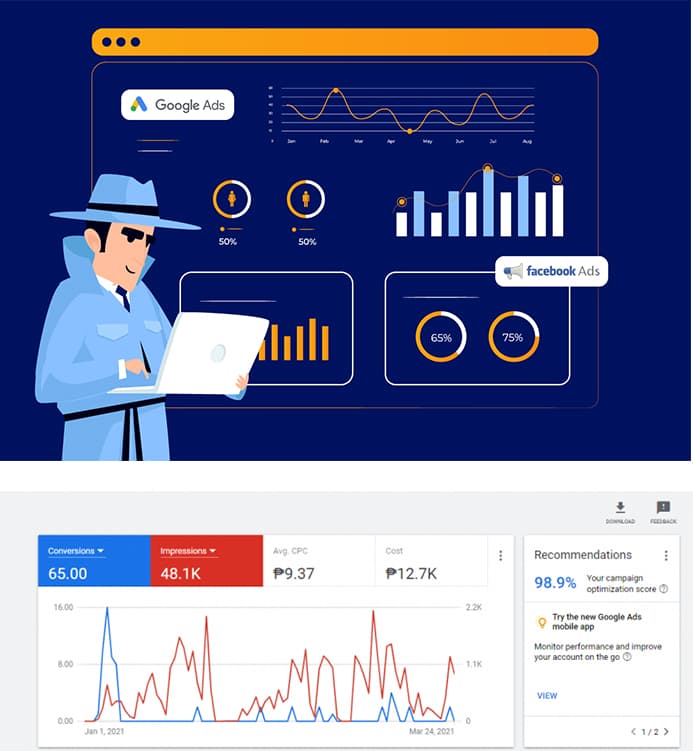
Shopping campaign data is rich but requires discipline to interpret correctly.
The first analytical layer is conversion efficiency by product.
Pull your Shopping campaigns by item ID and identify the distribution of your spend and revenue. In most accounts, 20-30% of products drive 70-80% of Shopping revenue. The question is whether the remaining products justify their spend allocation, or whether that budget would perform better concentrated in higher-converting segments.
The second layer is query-level analysis from the search terms report.
Which queries are driving clicks and conversions? Which are consuming the budget without converting? The answers to these questions should directly drive both negative keyword additions and title optimization decisions.
The third layer is competitive auction data from the Auction Insights report.
If competitors' impression share is rising on your core product categories, that is an early warning that requires either a bidding response or a feed quality improvement to maintain your position.
Remarketing and Audience Layering
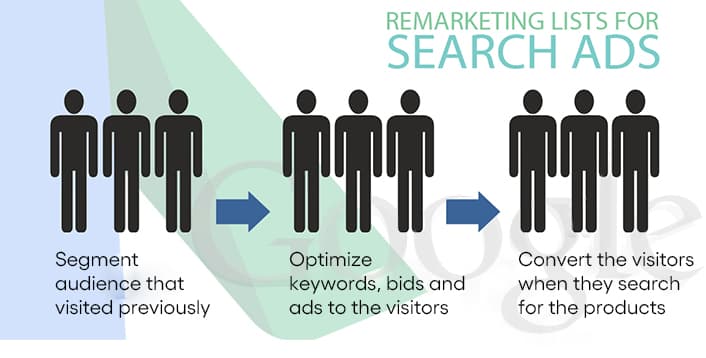
Remarketing Lists for Search Ads (RLSA) allow you to adjust bids or create dedicated campaigns for users who have already visited your site. This is a meaningful efficiency lever for Shopping because returning visitors, particularly those who have viewed specific products without purchasing, convert at substantially higher rates than cold traffic.
A practical RLSA structure:
- Identify your highest-value audience segments based on site behavior (product page viewers, cart abandoners, past purchasers in category)
- Create corresponding audience lists in Google Analytics or Google Ads
- Apply bid adjustments or dedicated campaign targeting for each.
The incremental conversion lift from properly deployed remarketing audiences typically ranges from 15-40% in accounts where it has not been used before.
Merchant Center Feed Health: The Overlooked Growth Lever
Feed warnings and item disapprovals are not just compliance issues. They are direct revenue impacts. A disapproved product does not show. A product with active warnings may have reduced visibility.
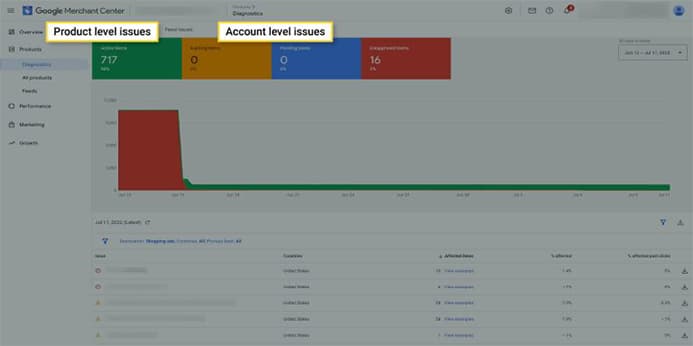
Google Merchant Center surfaces two types of alerts that warrant regular review.
Feed-level diagnostics flag structural issues with the data file itself:
- Formatting errors
- Missing required attributes
- Delimiter problems
These are generally fixed once and do not recur unless the feed generation process changes.
Item-level warnings flag product-specific issues:
- Missing GTINs for products that require them,
- Image quality below minimum standards,
- Title length violations,
- Price discrepancies between the feed and the landing page.
These require a systematic review because they accumulate over time as your catalog changes.
When you receive a disapproval, the troubleshooting workflow is:
- Read the specific disapproval reason in Merchant Center Diagnostics.
- Fix the issue on the source page or in the feed - not just in the Merchant Center interface.
- Request re-review through the Merchant Center dashboard.
- Monitor for re-approval within 1-3 business days.
For recurring disapprovals, audit your feed generation process: the issue is usually a mismatch between how your e-commerce platform generates data and what Merchant Center expects.
Building a weekly feed health review into your campaign management workflow, checking for new disapprovals and unresolved warnings, is the operational habit that prevents small feed issues from becoming significant visibility losses.
Frequently Asked Questions
How long does it take for Google Shopping products to get approved?
Most products are reviewed within 3-5 business days of feed submission. Initial account verification may take longer. Products with policy violations, missing GTINs, or low-quality images will require corrections before approval - monitor the Diagnostics tab daily during launch to catch these quickly.
What is the minimum budget for Google Shopping ads in India?
Indian SMEs typically start with ₹10,000-₹25,000 per month. Below this, the data volume is insufficient to optimize bidding meaningfully. Start with standard Shopping campaigns before moving to Performance Max - PMax requires sufficient conversion history to run efficiently.
What is the difference between Standard Shopping and Performance Max?
Standard Shopping gives you direct control over bidding, targeting, and product group segmentation. Performance Max uses machine learning to automate all of these across Google's full ad inventory. Standard Shopping outperforms PMax in early account stages when conversion data is thin. PMax typically wins at scale once the algorithm has sufficient historical data.
How do I optimize my Google Shopping feed for better ROI?
Start with product titles - front-load the most search-relevant attributes for your category. Then audit category mapping to the most specific leaf-level taxonomy. Verify all GTINs are present and accurate. Fix any image disapprovals. Finally, conduct weekly search term report analysis to build your negative keyword list. Feed optimization typically delivers more ROI improvement than bidding changes.
Why are my Google Shopping products getting disapproved?
The most common reasons are: price mismatch between feed and landing page, images that are too small (minimum 800x800px) or contain watermarks, missing GTINs for branded products, and out-of-stock products listed as available. The Merchant Center Diagnostics tab identifies the specific reason for each disapproval.
What Sustainable Shopping Performance Actually Looks Like
There is a version of Google Shopping optimization that chases short-term efficiency at the expense of long-term positioning.
Aggressive ROAS targets that restrict impression share below viable coverage levels, or cost-cutting on feed management that leads to quality degradation over time, can produce metrics that look good quarterly and then deteriorate.
The brands with durable Shopping performance treat feed quality as infrastructure, not a one-time project. They:
- review and iterate product titles based on search term data.
- maintain clean feed-to-landing-page alignment as their catalog changes.
- use performance data to continuously refine campaign structure rather than setting it once and leaving it.
- know their unit economics well enough to set ROAS targets that reflect actual margin realities rather than vanity benchmarks.
A 600% ROAS target might look impressive in a report while costing you 40% of your addressable Shopping impression share and surrendering top-of-funnel demand coverage to competitors who are willing to operate at a 350% ROAS with higher volume.
That trade-off between efficiency and coverage is one of the most important strategic decisions in Shopping campaign management. And it should be informed by your margin structure, your inventory capacity, and your customer LTV, not by what the platform dashboard suggests as a target.
Google Shopping rewards patience and precision. The brands generating the best ROAS aren't those with the largest budgets - they're the ones with the cleanest data and the sharpest understanding of their margin structure. That's what this guide is designed to help you build.
If your Google Shopping campaigns are burning budget without hitting your ROAS targets, the problem is almost always in the feed - not the bidding. Get a Shopping feed audit and see exactly what's holding your campaigns back. Request a Google Shopping Audit →

Aditya Kathotia
Founder & CEO
CEO of Nico Digital and founder of Digital Polo, Aditya Kathotia is a trailblazer in digital marketing. He's powered 500+ brands through transformative strategies, enabling clients worldwide to grow revenue exponentially. Aditya's work has been featured on Entrepreneur, Economic Times, Hubspot, Business.com, Clutch, and more. Join Aditya Kathotia's orbit on LinkedIn to gain exclusive access to his treasure trove of niche-specific marketing secrets and insights.