


Most marketing teams treat image optimization as a checkbox on a technical audit.
Compress the files, add alt text, and move on. That framing is why so many sites are bleeding organic traffic to competitors who understand what image performance actually signals to Google, and to users.
Here is the harder truth: Unoptimized images do not just slow your site. They erode conversion rates, suppress crawl efficiency, inflate your Core Web Vitals scores, and undercut every dollar you spend on paid acquisition by raising bounce rates.
When you fix image performance, you are not tidying up a technical footnote. You are removing friction from the top of your funnel.
This guide covers the full stack of image optimization in 2026, from format decisions to structured data to visual search, written for teams who want measurable outcomes, not just cleaner code.
What Makes Image Optimization a Revenue-Adjacent Lever
Before getting into tactics, the framing matters.
Google's ranking infrastructure increasingly rewards page experience signals:
- Largest Contentful Paint,
- Cumulative Layout Shift, and
- Interaction to Next Paint.
In a majority of cases, the LCP element on a page is an image. That means your hero image, product photo, or featured thumbnail is often the single element most responsible for whether your page passes Core Web Vitals thresholds.
Pages that fail LCP at the 75th percentile threshold face meaningful suppression in competitive SERPs. That suppression compounds. Lower rankings mean less traffic. Less traffic means fewer conversions. Addressing these issues is a core part of any Core Web Vitals optimisation programme, and the revenue impact of a hero image that takes 4.2 seconds to load is not theoretical.
There is a second dynamic worth naming: Google Images and visual search collectively account for a significant portion of discovery traffic that most analytics setups misattribute or ignore entirely.
Approximately 32.9% of Google searches return image results. Google Lens processes over 20 billion visual searches monthly. If your images are not structured, labeled, and technically sound, you are invisible in that distribution channel.
10 Image Optimization Best Practices to Look At
1. Format Selection: The Decision Most Teams Get Wrong
The conversation around image formats in 2026 is not really a debate anymore. WebP won for most use cases years ago.
The question is whether your team has moved past WebP to formats that offer a genuine compression advantage.
WebP remains the default choice for most web imagery.

Developed by Google, it delivers roughly 25-35% smaller file sizes than JPEG at comparable visual quality. Browser support is universal across modern environments.
If you are still serving PNG or legacy JPEG as your primary format, this is the first thing to fix.
AVIF has moved from promising to practical.

It offers compression efficiency that outperforms WebP by 20-50%, depending on the image type, with no perceptible quality loss at standard viewing sizes. Browser support now covers Chrome, Firefox, Safari, and Edge, which collectively represent the overwhelming majority of your user base.
For image-heavy pages, like product category pages or editorial features with multiple visuals, AVIF can materially reduce total page weight.
JPEG XL is the longest-term bet.

Designed as a successor to the entire JPEG ecosystem, it
- supports lossless and lossy compression,
- maintains backward compatibility, and
- handles both photographic and graphical content well.
Browser adoption is still incomplete as of early 2026, which means you will need fallback logic in your implementation. Not a priority for most teams today, but worth watching.
The practical implementation approach for most sites: Serve AVIF to browsers that support it, WebP as the fallback, and JPEG or PNG as the final fallback for legacy environments. The <picture> element with srcset handles this natively, or your CDN can automate it entirely.
Common mistake: Teams adopt WebP but serve it at the same dimensions as their original assets, negating most of the performance benefit. Format and dimension optimization are not interchangeable. Both matter.
2. Compression Strategy: Where Teams Leave the Most Performance on the Table
Image compression is not a binary choice between "small and blurry" or "large and sharp." The space between those poles is where most of the optimization opportunity lives.
Lossy vs. lossless compression is a context-dependent decision.
For photographic content, lossy compression at quality settings between 75-85 typically produces files that are visually indistinguishable from the source while cutting file size by 60-80%.
For logos, icons, and graphics with flat color areas, lossless or near-lossless compression preserves detail that lossy methods destroy.
Tools worth knowing:
- Squoosh (browser-based): Excellent for experimenting with format and quality settings side by side. Useful for establishing your quality baselines before automating.
- ImageOptim (macOS): Strong for batch lossless optimization, particularly for PNGs.
- Sharp (Node.js library): The right choice for pipeline-level optimization in modern web applications. Supports WebP, AVIF, and sophisticated compression controls.
- Cloudinary / Imgix: If you want to abstract image optimization entirely into your CDN layer, these platforms handle format selection, compression, resizing, and delivery automatically based on client signals.
One underappreciated optimization: strip image metadata before serving.
EXIF data, color profiles, and embedded thumbnails add file weight that users never see and search engines do not need. Most compression tools can handle this automatically.
For JPEG files especially, metadata stripping alone can reduce file size by 5-15%.
AI-assisted compression has matured significantly. Tools like Adobe Firefly's compression pipeline and several CDN-native AI modules can make per-image quality decisions that outperform static quality settings. The benefit shows up most clearly at scale, on sites with thousands of product images where manual tuning is impractical.
3. Responsive Images: The Implementation Gap
Most teams know they should serve different image sizes to different devices. Fewer have actually implemented this correctly.
The srcset and sizes attributes in HTML allow the browser to select the appropriate image variant based on the device's viewport width and pixel density.
The practical benefit: a mobile user on a 375px-wide screen loading a product image does not download a 2000px-wide asset. This single change can reduce image payload on mobile by 70% or more.
The width and height attributes deserve specific attention.
Including explicit dimensions in your image markup allows the browser to reserve the correct space before the image loads, preventing Cumulative Layout Shift.
CLS is a Core Web Vitals metric, and layout shift caused by images loading without reserved space is one of the most common CLS failure patterns. For more on fixing mobile-specific CLS issues, see our guide to mobile-first SEO.
What most teams miss: The sizes attribute needs to reflect your actual CSS layout, not a generic guess. If your image is displayed at 33vw on desktop and 100vw on mobile, your sizes value should say exactly that. Inaccurate sizes values push the browser to select suboptimal image variants, partially defeating the purpose of the whole setup.
4. Lazy Loading: Defaults and Exceptions
Lazy loading via the loading="lazy" attribute is now natively supported across all major browsers and should be the default for any image that is not in the initial viewport.
The performance benefit is real:
- deferred loading reduces initial page weight,
- accelerates Time to Interactive, and
- improves LCP for above-the-fold content by ensuring the browser's network bandwidth is not competed for by off-screen assets.
The exception matters as much as the rule.
Your LCP element should never be lazy loaded. If your hero image, product photo, or editorial header carries the loading="lazy" attribute, you have directly penalized your LCP score.
The browser will defer loading the most performance-critical asset on the page.
For LCP images specifically, the inverse optimization applies: use fetchpriority="high" to signal that the browser should prioritize this resource during its fetch phase. Combined with correct responsive image markup and an efficient format, this is a meaningful LCP improvement with minimal implementation effort.
5. File Naming and Alt Text: Low Effort, Non-Trivial Signal
These are foundational, and still executed poorly on the majority of sites.
File naming is about giving Google's crawler a text signal it can use to understand image content before it performs visual analysis. A file named IMG_4892.jpg tells Google nothing. A file named mens-trail-running-shoe-size-10.jpg tells Google the subject, category, and a likely query pattern. This signal is not dominant, but it is consistent, costs nothing to implement correctly, and compounds across thousands of images.
Practical conventions: lowercase, hyphen-separated, descriptive, keyword-relevant without being stuffed. Three to six words is usually sufficient.
Alt text serves two distinct purposes that are worth keeping separate in your mind. First, it is an accessibility requirement. Screen readers use alt text to describe images to visually impaired users, and failing to provide descriptive alt text excludes a meaningful segment of your audience. Second, it is an indexing signal for search engines that cannot reliably interpret image content at the pixel level.
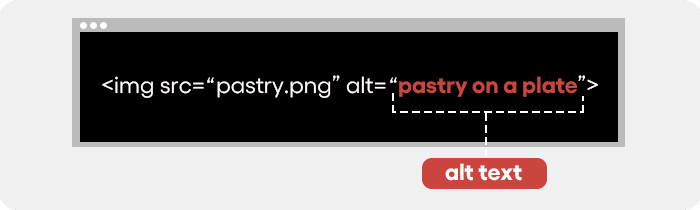
Good alt text describes what is in the image in plain language, with natural inclusion of relevant terms where they fit without forcing.
It does not need to include your brand name on every image. It does not need to be a keyword list. It should describe the image as you would explain it to someone who cannot see it.
What to avoid: Empty alt attributes on content images (acceptable for decorative images, not acceptable for images that carry meaning), alt text that duplicates the surrounding page copy verbatim, and alt text that exists purely for keyword density with no descriptive value.
Images are often the #1 cause of failing Core Web Vitals - and most teams don't know it until traffic drops. Get a technical image audit and see exactly what's slowing your pages down. Request Your Image SEO Audit →
6. Structured Data for Images: The Rich Result Opportunity
Structured data is how you communicate image context to Google in a format it can parse unambiguously. Without it, Google interprets your images through a combination of visual analysis and contextual inference from surrounding text. With it, you provide explicit signals about what an image depicts, who created it, and how it should be classified.
For more on how schema markup improves both rich snippets and AI Overview eligibility, see our schema markup guide.
The practical applications in 2026:
Product schema for e-commerce sites enables product images to appear in Google Shopping surfaces and image carousels with pricing and availability overlays.
For competitive product categories, this visibility is a meaningful traffic source that bypasses standard organic rankings.
ImageObject schema via Schema.org allows you to specify image captions, content URLs, thumbnail variants, and licensing information.
Here is a minimal JSON-LD example for an ImageObject:
{
  "@context": "https://schema.org",
  "@type": "ImageObject",
  "url": "https://example.com/images/product-hero.webp",
  "caption": "Blue trail running shoes with breathable mesh upper, size 10",
  "width": 1200,
  "height": 800,
  "contentUrl": "https://example.com/images/product-hero.webp"
}
Pages with structured image data show CTR lifts in the range of 80% compared to equivalent pages without it, according to Google's own documentation.
Article and Recipe schema automatically surface featured images in rich results formats.
If you are publishing editorial content or structured content types, image markup within your primary schema type is not optional if you want rich result eligibility.
Implementation is straightforward with any modern CMS or via direct JSON-LD injection. The investment is small. The visibility upside is disproportionate in categories where competitors have not implemented it.
7. Visual Search Optimization: Preparing for Google Lens at Scale
Visual search has moved from a curiosity to a real traffic channel. Google Lens is embedded in Google's core search experience on Android and available on iOS, with 20 billion monthly visual searches as of recent reporting. For brands in fashion, home goods, food, beauty, and consumer products, visual search is an acquisition channel that most SEO strategies have not systematically addressed.
The optimization logic follows similar principles to standard image SEO, but with additional emphasis on image clarity and subject isolation:
Clarity and resolution matter more for visual search than for standard web rendering.
Lens performs object recognition, which degrades on low-contrast, blurry, or heavily stylized images. Product images on white or neutral backgrounds with the subject clearly isolated perform better in visual search matching than lifestyle shots with complex backgrounds.
Contextual signals around the image remain important.
Alt text, surrounding copy, structured data, and page title collectively inform how Lens categorizes and surfaces an image. An image with strong visual clarity but weak surrounding context will underperform an equally clear image on a well-optimized page.
Mobile-first rendering is the delivery context for most Lens queries.
Your images need to load quickly on mobile networks, display correctly at mobile viewport sizes, and not depend on hover states or JavaScript-triggered reveals that do not function on touch interfaces.
Over-editing is a practical risk that is easy to overlook.
Heavily filtered images, aggressive background removal artifacts, or AI-generated product photography that departs significantly from real-world visual appearance can confuse recognition systems. This is particularly relevant for brands experimenting with AI-generated product imagery at scale.
8. CDN Image Delivery: When It Matters and When It Doesn't
A content delivery network improves image load times by serving assets from edge nodes geographically closer to the requesting user. For a global audience, this reduces latency meaningfully, particularly in regions underserved by your origin server's location.
The honest framing: For a brand whose customers are concentrated in a single region and whose origin server is appropriately located, a CDN's benefit for image delivery is incremental rather than transformational. The more significant benefit often comes from CDN-native image optimization capabilities, not purely the edge delivery.
Modern image CDNs can handle format negotiation, on-the-fly resizing, quality adjustment, and responsive breakpoint generation automatically based on client device signals:
- Cloudinary: Full-featured image management with AI-driven optimization and a generous free tier for smaller sites.
- Imgix: Developer-friendly API with real-time image processing. Strong for custom transformation pipelines.
- Fastly / Amazon CloudFront with Lambda@Edge: Lower-level infrastructure options that offer more control but require more configuration.
For teams without robust image optimization pipelines in their build process, this abstraction can compress months of engineering work into a configuration change. The connection to ongoing site health means CDN selection also belongs in any website maintenance conversation.
9. Image Sitemaps: Indexation Insurance
An image sitemap is not a substitute for correctly implemented page-level image markup, but it is a meaningful supplement for sites with large image inventories, images loaded via JavaScript, or images that exist in contexts where standard Googlebot crawling might miss them.
The core function: An image sitemap explicitly lists image URLs and associated metadata, ensuring Google can discover and index assets that might otherwise be overlooked. This is particularly relevant for e-commerce sites with thousands of product images, media archives, or sites that render images dynamically after initial page load.
What to include in your image sitemap entries:
- The image URL,
- a descriptive title,
- a caption where relevant,
- geographic location information for locally relevant imagery, and
- licensing information if applicable.
Submit via Google Search Console and monitor coverage reports for indexation gaps.
For large-scale image inventories, programmatic sitemap generation is the practical approach. Most enterprise CMS platforms support this natively or via a plugin.
For custom builds, the implementation is straightforward via templating.
10. Browser Caching: The Returning Visitor Optimization
Browser caching stores image assets in a user's local cache after their first visit, allowing subsequent page loads to serve images from local storage rather than re-downloading them.
For sites with returning visitor segments, this accelerates load times and reduces bandwidth consumption.
The implementation centers on two HTTP headers:
Cache-Control: max-age=31536000, immutable instructs the browser to cache the asset for one year and treat it as unchanged. The immutable directive is particularly valuable: it tells the browser to skip revalidation requests on page reload, saving a round trip.
For assets that you update periodically, cache-busting through versioned file names or query string parameters ensures users receive updated assets when needed without manually clearing caches. A naming convention like hero-image.v2.webp or a build pipeline that appends content hashes to file names handles this automatically.
One practical constraint: Cache headers are set at the server or CDN layer. Verify that your hosting configuration allows header modification, and confirm that your CDN is not overriding sensible cache policies with defaults that expire assets too aggressively.
The Common Mistake That Undermines All of This
You can execute every tactic in this guide and still see underwhelming results if your CMS or build pipeline is regenerating unoptimized images on every content update.
This is more common than it should be.
A team invests in format migration and compression tooling, then a content editor uploads a 4MB JPEG through the CMS interface, and the CMS serves it unprocessed because image optimization was configured once and is not enforced in the upload pipeline.
Sustainable image optimization requires enforcement at the point of ingestion, not just as a one-time project - which is why it belongs in any ongoing website performance programme.
That means either an image CDN that handles optimization on delivery, a build pipeline that processes images before deployment, or CMS-level rules that enforce upload constraints and automatic processing.
Manual optimization is a habit that does not survive team growth or editorial velocity.
What a Mature Image SEO Architecture Looks Like
To pull this into a decision framework:
Foundational layer (fix first): Format migration to WebP/AVIF, compression pipeline, explicit width/height attributes on all images, descriptive alt text, descriptive file names.
Performance layer (fix second): Responsive images with srcset and sizes, lazy loading for below-fold assets, fetchpriority="high" for LCP images, browser caching headers.
Visibility layer (ongoing): Structured data for eligible image types, image sitemap for large inventories, visual search optimization for product imagery.
Infrastructure layer (strategic): CDN with native image optimization, automated pipeline enforcement to prevent regression, monitoring via Core Web Vitals dashboard.
This is not a one-week project. A thorough implementation for a mid-size e-commerce or media site takes four to eight weeks when done correctly, including QA across device types and browsers. But the compounding nature of the payoff is what makes it worth the allocation. You optimize once, monitor continuously, and the performance benefit persists as long as the implementation holds.
Frequently Asked Questions
How do I know if images are hurting my Core Web Vitals?
Run Lighthouse in mobile simulation mode and check the LCP diagnostic - it identifies which element is the LCP and whether image size or format is the bottleneck. Google Search Console's Core Web Vitals report shows field data from real users at the page level, making it the most reliable indicator of where images are causing actual user-facing problems.
What is the correct alt text format for SEO?
Describe the image in plain language as you would explain it to someone who cannot see it, with natural inclusion of relevant keywords where they fit. Avoid keyword lists, brand-name repetition on every image, and empty alt attributes on content images. A good rule of thumb: if the image were removed and only the alt text remained, would it convey the same informational value?
Does Google index images from JavaScript-rendered pages?
Google can index images from JavaScript-rendered pages, but there is typically a crawl delay between initial page crawl and full JavaScript rendering. For images critical to your SEO or Shopping presence, serving them server-side or in the initial HTML is more reliable than depending on client-side rendering. An image sitemap provides a fallback indexation path.
Closing Thoughts
Image optimization is one of the cleaner examples of a technical investment with directly measurable commercial returns. Load performance affects conversion rates in a way that is well-documented across industries. LCP scores affect organic rankings. Visual search is a growing distribution channel. Structured data improves CTR.
The challenge is that image optimization sits at the intersection of engineering, content operations, and SEO, which means it often falls between team ownership. Someone has to own it with enough cross-functional authority to actually enforce the pipeline.
If your site has more than a few hundred pages and you have not done a comprehensive image audit in the last twelve months, the gap between your current state and what is achievable is almost certainly material.
Images are often the #1 cause of failing Core Web Vitals - and most teams don't know it until traffic drops. Get a technical image audit and see exactly what's slowing your pages down and what the realistic performance improvement looks like for your site. Request Your Image SEO Audit →

Aditya Kathotia
Founder & CEO
CEO of Nico Digital and founder of Digital Polo, Aditya Kathotia is a trailblazer in digital marketing. He's powered 500+ brands through transformative strategies, enabling clients worldwide to grow revenue exponentially. Aditya's work has been featured on Entrepreneur, Economic Times, Hubspot, Business.com, Clutch, and more. Join Aditya Kathotia's orbit on LinkedIn to gain exclusive access to his treasure trove of niche-specific marketing secrets and insights.