

Most Google Ads accounts leak twenty to forty percent of their budget on traffic that will never convert, and the platform's own optimization score will never tell you. A real audit does. This is the audit we run on every account we inherit: the search terms report that exposes the leak in ten minutes, the negative keyword discipline that stops it, the match-type and conversion-tracking traps that quietly inflate every number you report, and the account-structure problems that drain budget while everything looks fine on the dashboard.
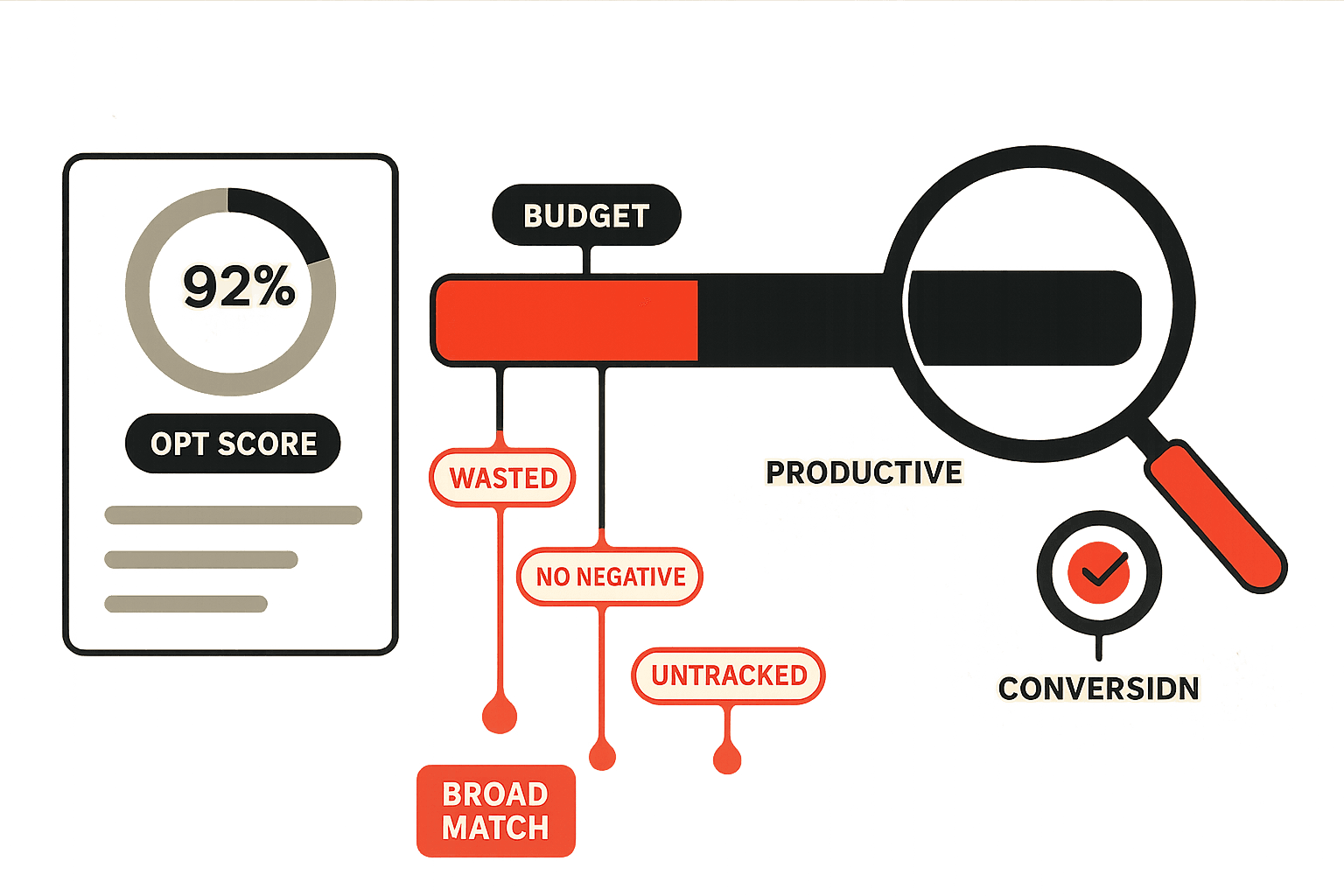
A founder shows me a Google Ads dashboard with a 92% optimization score and a worried expression. Spend is up, the account looks healthy by every metric Google chooses to put in front of them, and yet revenue is flat and the cost per acquisition keeps creeping. They want to know whether to cut the budget or hire someone to "manage it better."
Neither, usually. The budget is fine. The problem is that a meaningful slice of it, often a fifth to two-fifths, is being spent on clicks that were never going to turn into customers, and the account's own reporting is built to hide exactly that. The optimization score is not a measure of whether your money is working. It is a measure of how many of Google's recommended features you have enabled, most of which expand reach and spend. An account can be 100% optimized by Google's definition and 40% wasteful by yours at the same time.
A Google Ads audit is how you find the gap between those two numbers. It is not a vague "let's review the account" exercise and it is not the automated checklist a reseller emails you to win the pitch. It is a specific sequence of checks, each one aimed at a known source of waste, that ends with a prioritised list of changes ranked by how much budget each recovers. This is the audit we run on every account we take over, in the order we run it, with the traps that catch most advertisers called out at each step.
What a Real Audit Looks For
Wasted spend in Google Ads is not one problem. It is a handful of distinct leaks, and they compound. A broad-match keyword triggers on an irrelevant query, the irrelevant query has no negative keyword blocking it, the click lands on a page that was never built for that intent, the conversion tracking is double-counting so the campaign looks fine anyway, and the budget that should have gone to a profitable campaign is sitting in the wasteful one because the account structure was never reorganised. Each leak feeds the next.
That is why a real audit is sequential and not a single dashboard glance. You work through the sources of waste in order of how much they typically cost and how fast they are to fix. The diagram below shows the seven leaks we check on every account, roughly in the order they drain the most money.
We will work through these in roughly that order, because that is the order that recovers the most money for the least effort. None of it requires a tool more sophisticated than the Google Ads interface itself, although the work goes faster with the performance marketing metrics framework running alongside it so you know which numbers to trust.
Step 1: Read the Search Terms Report First
If you do only one thing from this entire audit, do this. The search terms report is the single most revealing screen in Google Ads, and most advertisers have never opened it.
Here is the distinction that matters. A keyword is what you told Google to target. A search term is what a person actually typed before your ad showed. They are not the same thing, and the gap between them is where most waste lives. You bid on "running shoes." Google, interpreting your match type generously, showed your ad on "how to clean running shoes," "running shoes repair," "free running shoes," and "running shoes job." You paid for every one of those clicks, and not one of them was a buyer.
To find it: open the campaign, go to the Insights and reports area, open the search terms report, set the date range to the last 30 to 90 days, and sort by cost, highest first. Then read down the list and ask one question of every term: would a person typing this ever buy what I sell? Three patterns will jump out.
Pure irrelevance. Queries that have nothing to do with your offer, triggered by loose match types. Job seekers, people looking for free versions, people looking for repairs when you sell new, people in the wrong category entirely. Every one of these is pure waste. They become negative keywords.
Wrong intent. Queries that are topically related but reflect a different stage or purpose. Someone searching "what is X" is researching, not buying. If the campaign is built to acquire customers, informational queries are draining budget that should go to commercial ones. These either become negatives or get moved to a separate, lower-bid campaign built for that intent.
High cost, zero conversions. Queries that are relevant on the surface but have spent real money over a meaningful period and produced nothing. These need judgement, not a reflex. A term with thirty clicks and no conversions over ninety days is a problem. A term with three clicks and no conversions is not enough data to act on yet.
The search terms report is not a one-time audit step. It is a weekly hygiene habit, because Google constantly tests new queries against your keywords as it expands match types. Audit it once and you clean the backlog. Review it weekly and the leak never reopens.
Step 2: Build a Real Negative Keyword List
The search terms report shows you the waste. Negative keywords are how you stop it. A negative keyword tells Google never to show your ad on searches containing that term, and a disciplined negative keyword strategy is the difference between an account that gets more efficient over time and one that bleeds steadily.
Most accounts have a thin, neglected negative list, often just a handful of obvious terms added once and forgotten. A real negative keyword strategy has structure.
Universal negatives belong in a shared list applied across the whole account: "free," "jobs," "salary," "diy," "how to," "wikipedia," "reddit," competitor brand names you do not want to bid on, and the rest of the terms that are never relevant no matter the campaign. Build this list once, apply it everywhere, and add to it as the search terms report reveals new universal junk.
Campaign-level negatives prevent campaigns from cannibalising each other. If you run separate campaigns for different product lines, each one should have the other product lines as negatives so the right campaign serves the right query. This is also how you stop a generic campaign from stealing traffic that a specific, higher-converting campaign should win.
Match types on negatives matter too. A broad-match negative for "free" blocks any search containing that word. A phrase or exact-match negative is narrower. Use broad-match negatives for genuinely universal junk and narrower negatives where you need precision, so you do not accidentally block a valuable term that happens to contain a common word.
The discipline is simple to state and rare to find: every search terms review ends with new negatives added. That feedback loop, query in, negative out, is the engine that keeps an account efficient.
Step 3: Audit Match Types and the Broad-Match Trap
Match types control how loosely Google is allowed to interpret your keywords, and over-broad matching is the mechanism behind most of the waste the first two steps clean up. Auditing match types means deciding how much interpretive licence you are handing Google, and on most accounts the answer is too much.
Broad match shows your ad on anything Google judges related, which on a poorly tracked account is an open invitation to spend. Phrase match requires the meaning of your phrase to be present. Exact match requires close variants of the specific term. The trade-off is reach versus control: broad reaches more, controls less; exact reaches less, controls more.
Google pushes broad match hard, because broad match maximises the searches your budget can be spent against. It can genuinely work, but only when three conditions are all true: conversion tracking is accurate enough that smart bidding has a real signal to optimise toward, a smart bidding strategy is actually in place to act on that signal, and an active negative keyword process is catching the junk broad match surfaces. Miss any one of those three and broad match becomes the most expensive setting in the account.
The audit question for each campaign is therefore not "broad or exact" in the abstract, it is "does this campaign have the tracking, bidding, and negative discipline to earn broad match." If it does not, tighten to phrase or exact until it does. The honest default for most advertisers is to start tight and widen deliberately as the data justifies it, not to start broad and hope the algorithm sorts it out. This same start-tight-and-widen logic is what separates performance marketing from brand spending: every widening of match has to be earned by a measurable return.
Step 4: Verify Conversion Tracking Before You Trust a Number
This step belongs earlier in importance than its position suggests, because everything downstream depends on it. If conversion tracking is wrong, every optimisation decision built on it is wrong too, and the account can look profitable while losing money, or look like it is failing while quietly working.
The failure modes are specific and common.
Nothing is tracked. The account optimises toward clicks because no conversion action is firing. Spend goes to whatever gets the most clicks, which is rarely whatever gets the most customers.
The wrong thing is tracked. A page view counted as a conversion, a newsletter signup weighted the same as a purchase, a thank-you page that fires on a refresh. The bidding optimises toward the cheap, easy action, and starves the valuable one.
Double counting. The same conversion fires twice, once through a global tag and once through a hardcoded snippet, and every campaign looks twice as good as it is. Decisions made on inflated numbers send budget to the wrong places.
Conversion value is missing. For ecommerce especially, tracking conversions without their revenue value means smart bidding optimises for conversion count, not conversion value, and happily buys ten low-value sales over two high-value ones.
To audit it: list every conversion action, confirm each one fires exactly once on the right event, check that values are passing where revenue matters, and use the Google Tag Assistant to watch the tags fire in real time on the live site. Re-verify after any website change, any tag manager edit, and any checkout or form update. Reliable tracking is the foundation the entire account stands on, and it sits inside the wider discipline of marketing attribution, where the question is not just whether a conversion fired but which channel actually deserves the credit. For the analytics side of the same problem, the Google Analytics signals most advertisers miss often expose tracking gaps the Ads interface alone will hide.
Step 5: Quality Score and What It Is Really Telling You
Quality Score is reported per keyword on a one-to-ten scale, and it directly affects what you pay: a low-Quality-Score keyword is charged more for the same ad position than a high-Quality-Score one. So low scores are a literal tax on the account. But the score itself is less useful than what it is made of.
Quality Score has three components, and the diagnostic value is in reading which one is weak.
Expected click-through rate measures whether people click your ad when it shows. If this is the weak component, the ad copy is not matching what searchers want, and the fix is in the creative.
Ad relevance measures how closely your ad matches the keyword's intent. If this is weak, the usual cause is structural: too many loosely related keywords crammed into one ad group, so no single ad can be relevant to all of them. The fix is tighter ad groups.
Landing page experience measures whether the page delivers what the ad promised. If this is weak, the page is slow, thin, or mismatched to the ad's promise, and the fix lives off the platform entirely, on the page.
That third component is where Ads and the rest of your funnel meet. A high-Quality-Score keyword pointing at a weak page still wastes money, because the click is cheap but the conversion never happens. This is exactly the gap a PPC landing page audit is built to close, and it is why an ads audit and a landing page audit are two halves of the same job. Treat Quality Score not as a grade to maximise but as a pointer to which link in the keyword-ad-page chain is broken.
Step 6: Audit Account Structure and Budget Allocation
By this stage the obvious leaks are sealed. Step six is about whether the budget is even pointed at the right campaigns, because an account can have clean search terms and accurate tracking and still misallocate spend badly.
The structural problems we find most often:
Budget trapped in losing campaigns. A campaign with a poor return is left running at full budget out of inertia, while a campaign that is clearly working is capped by its daily budget and leaving conversions on the table. The fix is to move budget toward marginal return: the next rupee or dollar should go wherever it produces the most incremental conversions, not wherever it has always gone.
Branded-term overspend. Bidding on your own brand name can be defensible when competitors are bidding on it, but many accounts spend heavily on branded terms they would have won organically anyway, paying for clicks that were already theirs. Audit branded spend against what organic would likely have captured for free, a question that connects directly to your SEO services strategy and how much of your branded demand the organic listings already own.
One giant ad group. Dozens of unrelated keywords in a single ad group, so no ad can be relevant to all of them, dragging ad relevance and Quality Score down across the board. The fix is to split into tight, themed ad groups where every keyword shares one intent.
Location and device waste. Ads serving in regions you do not sell to, or on devices that never convert, at full bid. The location and device reports show where this is happening, and bid adjustments or exclusions stop it. Seasonal and event-driven accounts have an extra layer here, where bid timing matters as much as bid level, the kind of dynamic adjustment that powers an Amazon Prime Day bidding strategy and applies equally to any demand spike.
Structure is unglamorous and it is where a surprising amount of budget quietly drains, because nothing on the main dashboard flags it. You have to go looking.
Step 7: Audit Performance Max and Smart Campaigns
Performance Max is Google's most automated campaign type, and it is also the hardest to audit, because it deliberately hides much of what it is doing. It spends across Search, Display, YouTube, Gmail, Discover, and Maps from a single campaign, with limited visibility into where the money actually goes.
That opacity is the risk. A Performance Max campaign can quietly shift the bulk of its spend to cheap, low-intent inventory that posts impressive-looking conversion numbers Google attributes generously to itself, while contributing little incremental revenue. The audit job is to claw back visibility.
Check the channel and placement breakdowns to the extent the interface allows, and watch for spend pooling on Display and YouTube when you wanted Search intent. Use account-level negative keywords and brand exclusions to keep PMax from simply re-buying your branded traffic and claiming credit for it. Compare PMax conversions against a holdout or against the period before it launched, to test whether it is producing incremental conversions or just reassigning conversions that would have happened anyway. PMax can work well for the right account and the right goal, but only with active management. The full decision of when Performance Max actually works for ecommerce is its own analysis, and it is essential reading before you let PMax run unsupervised. The same management discipline applies to any automated format, including the Google Display Network, where loose placement targeting wastes budget the same way.
The Audit Workflow: Triaging Every Search Term
The seven steps above describe what to check. The diagram below shows the decision that sits at the heart of the most important step, what to actually do with each search term once you have found it, because this is the judgement call that gets made wrong most often.
The trap in this decision is acting on too little data. A term with three clicks and no conversion is not a failure, it is a sample too small to judge. Set a threshold, a meaningful number of clicks or an amount of spend over a sixty-to-ninety-day window, and only act when a term clears it. Cut too early and you kill terms that would have converted; cut too late and you keep paying for losers. The threshold is what makes the triage disciplined instead of reactive.
Bidding, Budget, and the Marginal Dollar
Underneath every step in this audit is one principle that decides whether the account compounds or stagnates: spend should follow marginal return. The next unit of budget should go wherever it produces the most incremental conversions, and be pulled from wherever it produces the fewest.
That sounds obvious and is almost never how accounts are actually run. Budgets get set once and left, smart bidding targets get set to a number that felt right months ago and never revisited, and campaigns keep their allocation because cutting them feels like admitting a mistake. The audit is the moment to reset all of it against current data: which campaigns are at their budget cap while still converting profitably and deserve more, which are spending freely while returning little and deserve less, and whether the bidding strategy's target is still the right one for the current cost of a customer.
This is also where speed of follow-up multiplies the return on every rupee spent. A lead generated by a perfectly optimised campaign is still wasted if nobody acts on it fast, which is why the five-minute lead response rule belongs in any honest conversation about paid efficiency. The cleanest account in the world cannot outrun a sales process that lets leads go cold. And whether paid is even the right primary channel for a given goal is the larger strategic question behind growth marketing versus demand generation, one worth revisiting whenever an audit reveals that paid is buying demand the brand could be capturing more cheaply elsewhere.
How Often to Run the Audit
The cadence is two layers, not one.
The heavy structural audit, covering conversion tracking, match types, Quality Score, account structure, and budget allocation, is worth running quarterly on a stable account and monthly on a high-spend or fast-changing one. These are the checks that take real time and rarely change week to week.
The light hygiene pass is different. The search terms report should be reviewed weekly on any account spending meaningfully, because new irrelevant queries appear constantly and the negative list has to keep pace. Spend anomalies, a sudden cost spike or a campaign suddenly eating its budget, should be caught within days, not at the next quarterly review. And conversion tracking should be re-verified after every website change, because a single broken tag silently corrupts every decision that follows it until someone notices the numbers stopped making sense.
Run the heavy audit on a calendar, run the hygiene pass as a habit, and the account stays efficient instead of slowly re-accumulating the waste you just cleaned out.
The Mistakes We See Most Often
The errors that turn up again and again on Google Ads audits:
- Trusting the optimization score. Treating Google's score as a measure of efficiency when it mostly measures how many revenue-expanding features you have enabled.
- Never opening the search terms report. The single most revealing screen in the account, ignored on most of them.
- A neglected negative keyword list. A handful of obvious terms added once, with no feedback loop adding new ones from the weekly review.
- Broad match without guardrails. Handing Google maximum interpretive licence without the tracking, bidding, and negatives that make broad match safe.
- Optimising on broken tracking. Making confident decisions on conversion numbers that are missing, double-counted, or pointed at the wrong action.
- Maximising Quality Score for its own sake. Treating it as a grade instead of a diagnostic that points at which part of the chain is broken.
- Set-and-forget budgets. Leaving allocation frozen while performance shifts underneath it, so winning campaigns stay capped and losing ones stay funded.
- Letting Performance Max run blind. Enabling the most automated, least transparent campaign type and never auditing where its spend actually goes.
The Bottom Line
A Google Ads account does not waste money because the platform is broken. It wastes money because the platform is optimised for Google's revenue, the reporting is built to look reassuring, and almost nobody runs the specific, unglamorous checks that expose the gap between how healthy the account looks and how efficiently it actually spends.
That gap is the prize. On a typical account that has never been properly audited, a fifth to two-fifths of the budget is recoverable, and most of it comes from the first three steps: read the search terms report, build a real negative keyword list, and bring match types under control. Verify the conversion tracking so you can trust the numbers, read Quality Score as a diagnostic, fix the account structure so budget follows marginal return, and bring Performance Max into the light. None of it requires a fancier tool than the interface you already have. It requires the discipline to actually look.
Do that on a quarterly cadence with a weekly hygiene pass, and the account stops being a slow leak and becomes what it should be: a channel where every dollar is pointed at traffic that can convert, the reporting tells the truth, and the budget compounds instead of bleeds.
Not sure how much of your Google Ads budget is leaking? We run a full Google Ads audit that reads your search terms report, maps every source of wasted spend, verifies your conversion tracking, and returns a prioritised plan ranked by the budget each fix recovers. Most accounts we audit are wasting a fifth to two-fifths of their spend. Request a Google Ads audit
Cross-Linked Resources for Paid Media and Growth
A Google Ads audit sits inside a wider paid media and growth programme. The pieces below cover the surrounding work:
- Google Ads Agency for ongoing management that keeps the account efficient after the audit
- PPC Services for multi-platform paid strategy across Google, Meta, and beyond
- Meta Ads Agency for the same spend-efficiency discipline applied to Facebook and Instagram
- PPC Landing Page Audit for the post-click half of the job, where Quality Score's landing page component is won or lost
- 10 Performance Marketing Metrics for the diagnostic numbers that tell you which campaigns are actually working
- Performance Marketing vs Branding for deciding how much of the budget should chase measurable return
- When Performance Max Works for Ecommerce for the full decision on PMax before you let it run unsupervised
- Marketing Attribution for getting the conversion credit right across channels
- Google Analytics Insights You Are Missing for the analytics-side checks that expose tracking gaps the Ads interface hides
- The Five-Minute Lead Response Rule for protecting the return on every lead the ads generate
- Growth Marketing vs Demand Generation for the strategic question of whether paid is the right primary channel at all
- SEO Services for the organic strategy that should be capturing branded demand before paid pays for it

Aditya Kathotia
Founder & CEO
CEO of Nico Digital and founder of Digital Polo, Aditya Kathotia is a trailblazer in digital marketing. He's powered 500+ brands through transformative strategies, enabling clients worldwide to grow revenue exponentially. Aditya's work has been featured on Entrepreneur, Economic Times, Hubspot, Business.com, Clutch, and more. Join Aditya Kathotia's orbit on LinkedIn to gain exclusive access to his treasure trove of niche-specific marketing secrets and insights.