

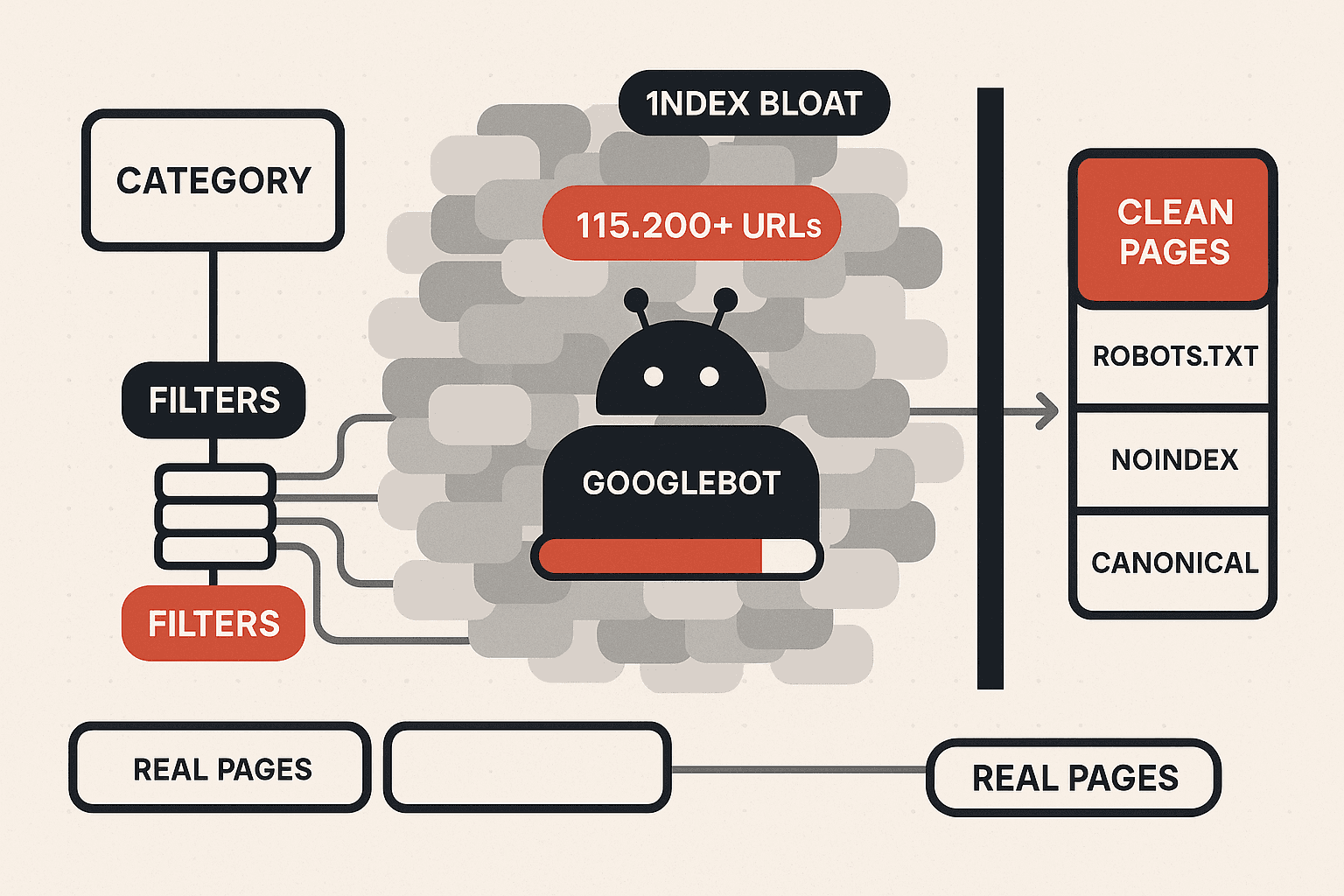
A category page with six filters and forty filter values can spawn hundreds of thousands of crawlable URLs. Googlebot spends its limited crawl budget wading through that junk while your real product and category pages wait days to be recrawled. This is the system we use to bring faceted navigation under control: how filter URLs explode, the four failure modes they cause, the decision tree for which filtered pages to index, crawl, or block, and the platform-by-platform fix.
An ecommerce founder ships a new product line on a Monday. By Friday the products still are not ranking, still are not even showing in the index for their own names. The content is good. The pages are well built. Nothing is technically broken on the product pages themselves.
The problem is not on the product pages. It is in the navigation that surrounds them.
Somewhere on that store, a category page offers shoppers a tidy set of filters: size, colour, brand, price, rating, material. Useful filters. Filters every customer expects. And every time a shopper clicks one, the site generates a new URL. Click two filters, a new URL. Click three, another. The store has quietly created a near-infinite space of crawlable pages, and Googlebot is dutifully crawling all of it.
That is faceted navigation, and on a large store it is the single most expensive technical SEO problem nobody can see. It does not throw an error. It does not break a page. It just slowly starves the pages that matter of the crawling and indexing they need. This post is the system we run to fix it.
What Faceted Navigation Actually Is
Faceted navigation is the filtering system on an ecommerce category page. It lets a shopper take a broad list, say, all running shoes, and narrow it by attributes: brand, size, colour, price band, rating. Each attribute is a facet, and each value within it is a filter. It is genuinely good design. Shoppers find products faster, bounce less, and convert better with it than without it.
The SEO problem is not the filtering. It is what happens to the URL when a filter is applied.
On most platforms, applying a filter changes the URL. It might append a query parameter (?color=red&size=10), or it might create a path segment. Either way, the filtered view becomes a distinct, crawlable, internally linked URL. And because filters combine freely, the number of possible URLs is not additive, it is multiplicative.
Consider a single category page with six facets, each holding a modest set of values:
- Brand: 10 values
- Colour: 8 values
- Size: 12 values
- Price band: 5 values
- Rating: 4 values
- Material: 6 values
The number of unique filter combinations is not 45. It is 10 x 8 x 12 x 5 x 4 x 6, which is 115,200. Add sort orders and a "view" toggle and it multiplies again. One category page has just generated more than a hundred thousand crawlable URLs, and almost none of them will ever rank for anything or earn a single visit from search.
Now multiply that by every category on the store. This is how a shop with 2,000 real products ends up with several million URLs that Google can find, follow, and crawl.
How Filter URLs Quietly Drain Your Crawl Budget
To see why this matters, you have to understand crawl budget. Crawl budget is the finite amount of crawling a search engine will spend on your site in a given window. It is governed by two things: how fast and reliably your server responds, the crawl rate limit, and how much the engine wants to crawl you, the crawl demand. Neither is infinite, and on a large site you will always hit the ceiling.
Here is what happens when faceted navigation is uncontrolled. Googlebot lands on a category page, sees the filter links, and follows them. It discovers a filtered URL, then the filtered-plus-sorted URL, then the three-filter combination. Each one is a new page to fetch. The crawler works through them because they are linked and crawlable and it has no way of knowing in advance that they are worthless.
Every one of those fetches spends budget. And the budget spent crawling a ?color=red&sort=price-asc&page=3 URL is budget not spent recrawling the new product line you launched on Monday.
The result is a recrawl lag. Pages take longer to be discovered, longer to be indexed, and longer to reflect updates. If you have ever wondered why a page improvement took weeks to move rankings, faceted navigation is a prime suspect. We walk through how to confirm a crawl-driven cause when traffic moves in our Search Console traffic-drop decision tree.
The Four Failure Modes of Uncontrolled Faceted Navigation
Faceted navigation does not cause one problem. It causes four, and they compound.
1. Crawl budget waste. The mechanism above. Googlebot spends its allocation on filter URLs instead of your real pages, so indexing and recrawling slow down across the whole site. This hits large stores hardest, because they are the ones already operating near their crawl ceiling.
2. Index bloat. When filter URLs get indexed, the index fills with thousands of thin, near-duplicate pages. A store with 2,000 products can have 200,000 URLs in Google's index. This dilutes the site's perceived quality, because a large share of the indexed pages are low-value, and Google's site-level quality assessment is influenced by the ratio of strong pages to weak ones.
3. Duplicate and near-duplicate content. A filtered view of a category usually shows the same products, the same descriptions, and the same on-page content as a dozen other filter combinations. Search engines see a cluster of pages competing to represent the same content, none of them clearly the canonical version, and the ranking signal splits across all of them. This is keyword cannibalisation at industrial scale, and it deserves the same systematic treatment we describe in our keyword cannibalisation audit.
4. Link equity dilution. Internal links are how authority flows through a site. When a category page links to a hundred filter URLs, a meaningful share of that page's internal link equity flows into pages that will never rank, instead of concentrating on the category and product pages that should. The store is effectively voting for its own junk.
These four together explain a pattern we see constantly on ecommerce audits: a store with good products, good content, and decent backlinks that simply cannot get its pages indexed and ranked fast enough. The store is not under-optimised. It is drowning its own signal. It is a close cousin of the visibility problem we cover in the hidden SERP squeeze killing ecommerce rankings.
The Decision: Index, Crawl, or Block
Here is the mistake almost every store makes. They treat faceted navigation as a single switch: either index all the filter pages or block all of them. Both are wrong.
Block everything and you throw away genuine ranking opportunities, because some filtered views match exactly how people search. Index everything and you get all four failure modes above. The correct approach is per-facet triage. Every filter combination falls into one of four buckets, and the bucket is decided by one question: does this filtered page have real search demand?
Walk the tree facet by facet:
Bucket 1: Index it. The filtered view matches real search behaviour. People search "nike running shoes", "red summer dresses", "leather office chairs". A single high-demand facet, usually brand or sometimes colour or a key attribute, applied to a category, produces a page worth ranking. Do not leave this as a parameter URL. Promote it to a real, static, indexable landing page with a clean URL, a unique title and meta description, a short block of unique intro copy, and a place in your internal link structure. Validate the demand with keyword data first, the same way we describe in our guide to using keywords strategically for ecommerce ranking.
Bucket 2: Noindex, follow. The filtered page changes content in a way that is useful to users but has no meaningful search demand, for example a single niche filter or a two-filter combination nobody searches for. Keep it crawlable so internal link equity flows through it, but apply a noindex tag so it never enters the index. This is most of your single-filter long tail.
Bucket 3: Block in robots.txt. The parameter does not change the meaningful content of the page at all. Sort orders, view toggles, items-per-page, session IDs, tracking parameters. These have zero indexing value and zero ranking value, and there is no reason to spend a single crawl request on them. Disallow the parameter pattern in robots.txt.
Bucket 4: Canonicalise. The filtered URL is a genuine duplicate of a cleaner page. Apply a canonical tag pointing to the clean category URL so duplicate signals consolidate. Remember the canonical is a hint, not a command, and it does not save crawl budget on its own, so on a heavily bloated section pair it with noindex rather than relying on canonical alone.
The Fix, Layer by Layer
A complete faceted navigation fix is not one change. It is a coordinated set of layers, applied in order.
Layer 1: Audit and inventory. Before changing anything, map what exists. Crawl the site and list every parameter in use. For each one, record what it does, whether it changes content, and whether the resulting pages have search demand. This inventory is the input to every later decision. A proper SEO audit will produce this parameter inventory as a standard deliverable.
Layer 2: robots.txt for zero-value parameters. Disallow the patterns from bucket 3, sort, view, pagination display modes, session and tracking parameters. This is the fastest win and it immediately stops the largest single source of crawl waste. Be precise with the patterns so you do not accidentally block a parameter that matters.
Layer 3: noindex for crawlable low-value pages. Apply noindex, follow to the bucket 2 pages, the single-filter long tail with no search demand. They stay crawlable, equity still flows, but they leave the index. Index bloat shrinks over the following weeks as Google recrawls and drops them.
Layer 4: canonical for duplicate views. Apply canonical tags on the bucket 4 duplicate views, pointing back to the clean category page.
Layer 5: promote the winners. Take the bucket 1 filter combinations with proven demand and build them as real landing pages, static URLs, unique metadata, unique intro copy, internally linked from the parent category and from relevant content. This is where faceted navigation stops being a liability and becomes a source of traffic. It is the same logic as a programmatic SEO page build, applied to your highest-demand filter views.
Layer 6: internal linking discipline. Stop linking to junk. The filter UI should let users filter without the crawler treating every state as a followable link. Common techniques include rendering filter controls so that low-value combinations are not crawlable links, and making sure your only crawlable internal links point to category pages, product pages, and the promoted bucket 1 landing pages. Concentrate the link equity where it earns.
Layer 7: clean XML sitemaps. The sitemap should list only canonical, indexable URLs, real categories, products, and promoted landing pages. It should never contain a parameter URL. A clean sitemap is a clear instruction to Google about what you actually want crawled and indexed.
One warning. Sequence matters. If you block a URL pattern in robots.txt before Google has recrawled the pages and seen their noindex tags, Google cannot read the noindex, because it is no longer allowed to crawl the page. For sections already heavily indexed, apply noindex first, wait for the index to clear, then add the robots.txt block. For new parameter patterns not yet indexed, robots.txt straight away is fine.
Implementation by Platform
The principle is identical everywhere. The levers differ.
Shopify. Shopify generates filter URLs as query parameters and gives merchants limited native control over them. Shopify applies its own canonical behaviour by default, which handles part of the duplicate problem. The practical approach: rely on the default canonicalisation, use robots.txt rules where the platform permits to block sort and view parameters, and focus your energy on bucket 1, building dedicated collection pages for the filter views that have search demand. Do not try to micro-manage the parameters Shopify will not let you control. Spend the effort where it pays.
WooCommerce. Filter behaviour depends on the theme and the filtering plugin. The fix is a combination of plugin configuration, choosing filter widgets that do not create crawlable links for low-value states, plus manual robots.txt rules and meta robots control through an SEO plugin. WooCommerce gives you enough access to apply all four buckets, but it takes deliberate configuration.
Magento and Adobe Commerce. Magento gives the most control. It has native settings for which attributes are searchable and filterable, supports per-attribute canonical and indexing configuration, and can be set so only chosen attribute pages are indexable while everything else is controlled. On Magento the full decision tree can be implemented properly, which is also why a Magento faceted navigation setup rewards a thorough technical pass.
Across all three, the work belongs in a structured technical SEO programme rather than a one-off tweak, because the rules need to be maintained as the catalogue and the filter set evolve.
How to Measure the Fix
You cannot manage what you do not measure. Track these signals before and after.
Google Search Console, Pages report. Watch the indexed page count and the excluded buckets. A large "Crawled, currently not indexed" or "Discovered, currently not indexed" count relative to your real page count is the index-bloat fingerprint. After the fix, the indexed count should fall toward your true page count and the excluded buckets should stabilise.
Search Console, Crawl Stats. Under Settings, the Crawl Stats report shows what Googlebot is fetching. Before the fix, a high share of crawl requests hit parameter URLs. After it, that share should drop and crawling should shift toward real pages.
Site crawl. Run Screaming Frog or a similar crawler. Compare total URLs found against your real product and category count. The multiple should fall sharply after the fix.
Server log files. The definitive method. Logs show exactly which URLs Googlebot fetched. Before the fix, a large share is filter junk. After it, Googlebot's attention concentrates on the pages that matter. If you can get log access, use it.
Indexing speed. The outcome metric. Time how long a newly published product page takes to be indexed. As crawl budget is freed, that time should shrink, and that is the whole point of the exercise.
A page that has fallen out of crawl attention entirely and stopped earning traffic is worth checking against our orphan page audit too, since faceted navigation bloat and orphaned pages often show up on the same store.
The Mistakes We See Most Often
A short list of the errors that turn up again and again on ecommerce technical audits:
- Blocking everything. Throwing away the bucket 1 filter views that could rank. The brand and key-attribute filters are real traffic opportunities.
- Indexing everything. The opposite error. All four failure modes at once.
- robots.txt before noindex. Blocking crawl on already-indexed pages so Google can never see the noindex, leaving the bloat stuck in the index.
- Canonical as a cure-all. Treating canonical tags as a complete fix. They are a hint, they do not save crawl budget, and Google can ignore them.
- Ignoring internal links. Applying noindex but still linking to every filter state from the UI, so the crawler keeps discovering and crawling them anyway.
- Parameter URLs in the sitemap. Telling Google to crawl exactly the URLs you are trying to suppress.
- Set and forget. Applying the rules once and never revisiting them as the catalogue, the filters, and the platform change.
The Bottom Line
Faceted navigation is not a bug. It is a feature your customers need and your store should keep. The bug is leaving it uncontrolled, so that a useful filtering system quietly generates hundreds of thousands of crawlable URLs, drains the crawl budget your real pages depend on, bloats the index with thin duplicates, and dilutes the link equity that should be concentrating on your products.
The fix is not a single switch. It is triage. Decide, facet by facet, which filtered views earn indexing because they match real search demand, and promote those to proper landing pages. Keep the useful-but-low-demand long tail crawlable and out of the index with noindex. Block the zero-value sort and view parameters in robots.txt so not one crawl request is wasted on them. Canonicalise the genuine duplicates. Keep your internal links and your sitemap pointed only at pages that matter.
Do that, and Googlebot stops wading through junk and starts spending its budget where your revenue is. New products get indexed in days, not weeks. Page updates take effect faster. The store stops drowning its own signal. For a large catalogue, this is often the single highest-leverage technical SEO project available, and it is invisible until someone goes looking for it.
Not sure how much crawl budget your filters are wasting? We run an ecommerce faceted navigation audit that inventories every parameter, maps your index bloat against your real page count, analyses what Googlebot is actually crawling, and returns a prioritised index, crawl, or block plan for every facet. Request a faceted navigation audit
Cross-Linked Resources for Ecommerce Technical SEO
Faceted navigation sits inside a wider technical and ecommerce SEO programme. The pieces below cover the surrounding work:
- Ecommerce SEO Agency for the full ecommerce organic programme that faceted navigation plugs into
- Technical SEO Services for crawl, index, and architecture work across the whole site
- SEO Audit Services for the parameter inventory and index-bloat diagnosis that starts this fix
- SEO Services for the broader organic strategy these technical fixes support
- Ecommerce SEO Checklist for the complete ecommerce optimisation list
- The Hidden SERP Squeeze Killing Ecommerce Rankings for the visibility pressures around ecommerce listings
- Keyword Cannibalisation Audit for the duplicate-content side of faceted navigation
- Orphan Page Audit for pages that have dropped out of crawl attention
- Search Console Traffic-Drop Decision Tree for diagnosing crawl-driven traffic changes
- Programmatic SEO Playbook for building the high-demand filter views into real landing pages at scale
- Schema Markup Secrets for the structured data on the category and product pages you are protecting
- Using Keywords Strategically for Ecommerce for validating which filter combinations have the demand to deserve indexing

Aditya Kathotia
Founder & CEO
CEO of Nico Digital and founder of Digital Polo, Aditya Kathotia is a trailblazer in digital marketing. He's powered 500+ brands through transformative strategies, enabling clients worldwide to grow revenue exponentially. Aditya's work has been featured on Entrepreneur, Economic Times, Hubspot, Business.com, Clutch, and more. Join Aditya Kathotia's orbit on LinkedIn to gain exclusive access to his treasure trove of niche-specific marketing secrets and insights.