

Most websites bleed traffic from pages that lost their internal links, not from pages that lost their rankings. Here is the operator's audit we run on client sites to find orphaned URLs, decide which ones are worth recovering, and rebuild internal architecture around the ones that are.
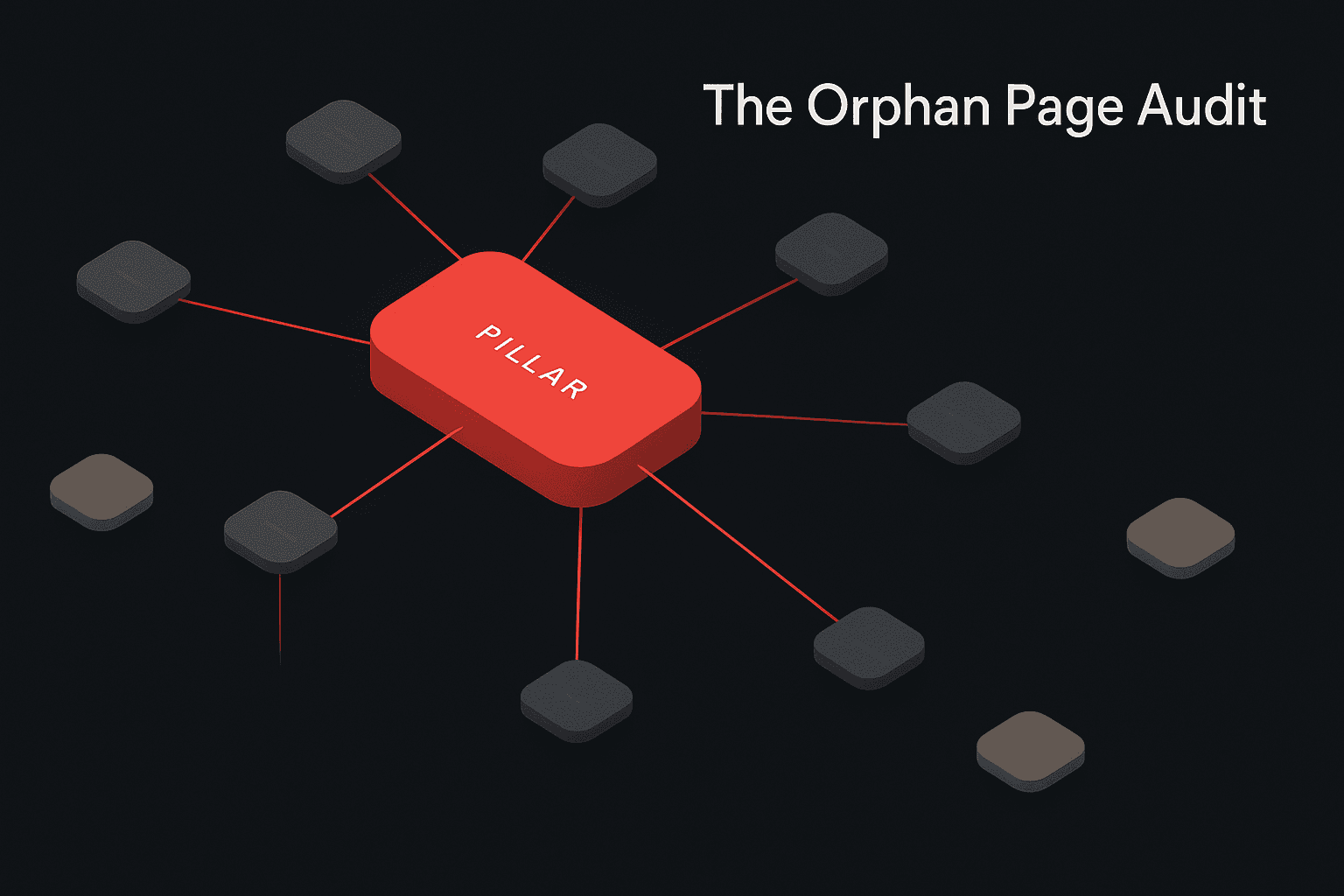
A founder of a content-led B2B SaaS company sent us a Search Console screenshot last month with a question we hear constantly. Her site had 312 indexed pages. Twenty-eight of them produced 91 percent of the organic traffic. The rest had quietly stopped earning impressions over the previous eighteen months. She wanted to know whether Google had downranked the older content or whether something else was going on.
What we found when we audited the site was something else. Of the 284 underperforming pages, 119 were structurally orphaned. They had no internal links pointing at them from any other indexable page. They existed in the sitemap. They were in Search Console. They were technically live. But the rest of the site had quietly forgotten they existed.
Forty-one of those orphaned pages had previously ranked in the top 20 for commercial keywords. They had not lost their rankings. They had lost their internal context, and the rankings had decayed as a downstream consequence.
This is the most common form of invisible traffic loss we audit in 2026, and it is almost never diagnosed correctly. Teams assume the problem is content quality, algorithm changes, or competitive pressure. The actual problem is architectural, and it is fixable in a few weeks of focused work.
This piece is the seven-step orphan page audit we run when a client suspects their archive is underperforming. It covers how to find every orphan, how to triage the recovery list, how to decide what to redirect versus what to revive, and the internal linking pattern that prevents the problem from coming back.
What an Orphan Page Actually Is
An orphan page is a URL on your site that has no internal links pointing to it from any other indexable page on the same domain.
Search engines can still discover the page. It might be in your sitemap. It might have an external backlink. A user might land on it from an old social post. But internally, no other page votes for it. No anchor text describes it. No topical context surrounds it.
The consequences of being orphaned are structural rather than penal:
- The page accumulates no domain-internal link equity
- It receives no contextual anchor text signal from related pages
- It gets crawled less frequently than connected pages
- It is excluded from the topical silo signals that influence ranking
- It rarely surfaces in AI answer engine citations
A page can have excellent content, strong intent match, and clean technical SEO and still be a structural ghost. The fix is not editorial. The fix is architectural.
This is the same architectural lever we covered from the strategy side in Topical Authority in 2026: How to Build Content Silos That Rank in Google AND Get Cited by AI. Topical authority is what an orphan-free silo produces. The audit in this piece is what gets you there from a messy starting point.
Why Orphan Pages Accumulate on Healthy Sites
Orphans are not a sign of negligence. They are the natural byproduct of how content sites evolve.
The seven most common causes we see in audits:
1. Navigation redesigns. A new header or footer drops the link to "All Resources" or "Archive," and every post that used to be discoverable through that path becomes harder to crawl.
2. Category restructures. Renaming /marketing/ to /digital-marketing/ and migrating posts to the new path leaves any post that pointed to the old taxonomy with broken outbound links and any internal link map built on the old slug stale.
3. Blog pagination decay. Older posts get pushed to page 8 or page 12 of an archive that nothing links into. Search engines crawl these pages so rarely that the inbound internal links from them effectively stop counting.
4. Programmatic SEO publishing without internal linking logic. A team ships 8,000 templated pages with no algorithm for inbound links from other site pages. The pages exist, but the rest of the site has no idea about them. We covered this failure mode in detail in our Programmatic SEO 2026 Playbook.
5. CMS migrations. A migration from WordPress to a headless setup, or one CMS to another, frequently imports URLs and content but loses the inbound internal link graph because internal links are usually stored as raw HTML inside body content, not as structured relationships.
6. Campaign and landing pages. A page built for a paid campaign, a webinar, or a product launch never gets integrated into the main site IA after the campaign ends. It is now an orphan with one external backlink and no internal context.
7. Editor turnover. A new editor prefers different reference posts, stops linking to the old library, and over six months the older inventory gets cited less and less by new content.
None of these are signs that the site is broken. They are signs that the site has been edited by humans for more than two years.
The Real Business Cost of Orphan Pages
The cost of orphan pages is usually invisible because the loss is opportunity, not breakage. Here is what we measure on audits:
Lost impression share. Orphaned pages on competitive keywords routinely sit one to four positions below where their content quality predicts they should rank. The compound effect across 80 to 200 orphaned pages can be 15 to 40 percent of total impression share for the silo.
Crawl waste. Search engines have a finite crawl budget per domain. Orphans pull crawl budget that could be spent re-evaluating high-value pages, hurting freshness for the pages that actually matter.
Topical authority dilution. A site with 600 indexable pages, of which 200 are orphans on unrelated topics, looks less coherent to Google's quality systems than a site with 400 deeply interlinked pages on a focused topic.
AI citation suppression. AI answer engines weight source authority heavily. A page nothing on its own domain links to fails the most basic confidence check, even when the content itself is strong.
Conversion leakage. Orphan pages that do attract any traffic typically have stale CTAs, outdated forms, or no path to a current money page. Even when they earn a session, they do not convert it.
The audit below is built to recover all of these.
The Seven-Step Orphan Page Audit
This is the audit we run on every technical SEO engagement at the start, and again at month nine. It takes one to two days of analyst time on a mid-size site and produces a prioritized recovery list with explicit linking actions.

Step 1: Establish the canonical URL universe
The first step is getting an accurate count of every URL Google considers part of the site.
Pull from three sources:
- XML sitemap. Export every URL listed in your live sitemap.
- Google Search Console. Export the full Pages report from Search Console for the last 90 days. This gives you every URL Google has crawled or attempted to crawl, with status data.
- Server logs or analytics. Pull every URL that received at least one organic session in the last 12 months from GA4 or your analytics platform.
Deduplicate the three lists into a single canonical URL universe. This is your denominator. Every orphan calculation downstream is relative to this universe.
For sites that want a deeper view of how Google treats individual URLs, the URL Inspection API exposes useful state at the per-URL level. We rely on this on enterprise audits, where the page-level coverage status reveals whether Google sees the orphan as a low-value crawl candidate.
Step 2: Run an internal-only crawl
Open Screaming Frog, Sitebulb, JetOctopus, or your crawler of choice. Use default mode, which only follows internal links from your homepage outward.
Two important configuration choices:
- Do not enable "Crawl URLs in sitemap" or any setting that injects URLs from outside the link graph. The point of this crawl is to see what your site actually links to.
- Set the crawler to honor your robots.txt and respect any noindex directives, so the crawl reflects the indexable internal structure.
Let the crawl complete. Export the full list of URLs the crawler discovered. This is your "internally-discoverable" set.
Step 3: Identify the orphan candidates
Subtract the internally-discoverable set from the canonical URL universe.
The difference is your orphan candidate list. Every URL on this list exists in your sitemap or Search Console but cannot be reached by following internal links from your homepage.
A typical mid-size site of 500 to 2,000 pages will surface anywhere from 40 to 400 orphan candidates. Sites that have been through a migration or a programmatic push will surface more.
This list is the raw material. It is not yet a recovery list, because some of the orphans will be intentionally orphaned (thank-you pages, gated PDFs, internal tools) and some will be junk that should be deleted, not revived.
Step 4: Triage the orphan list
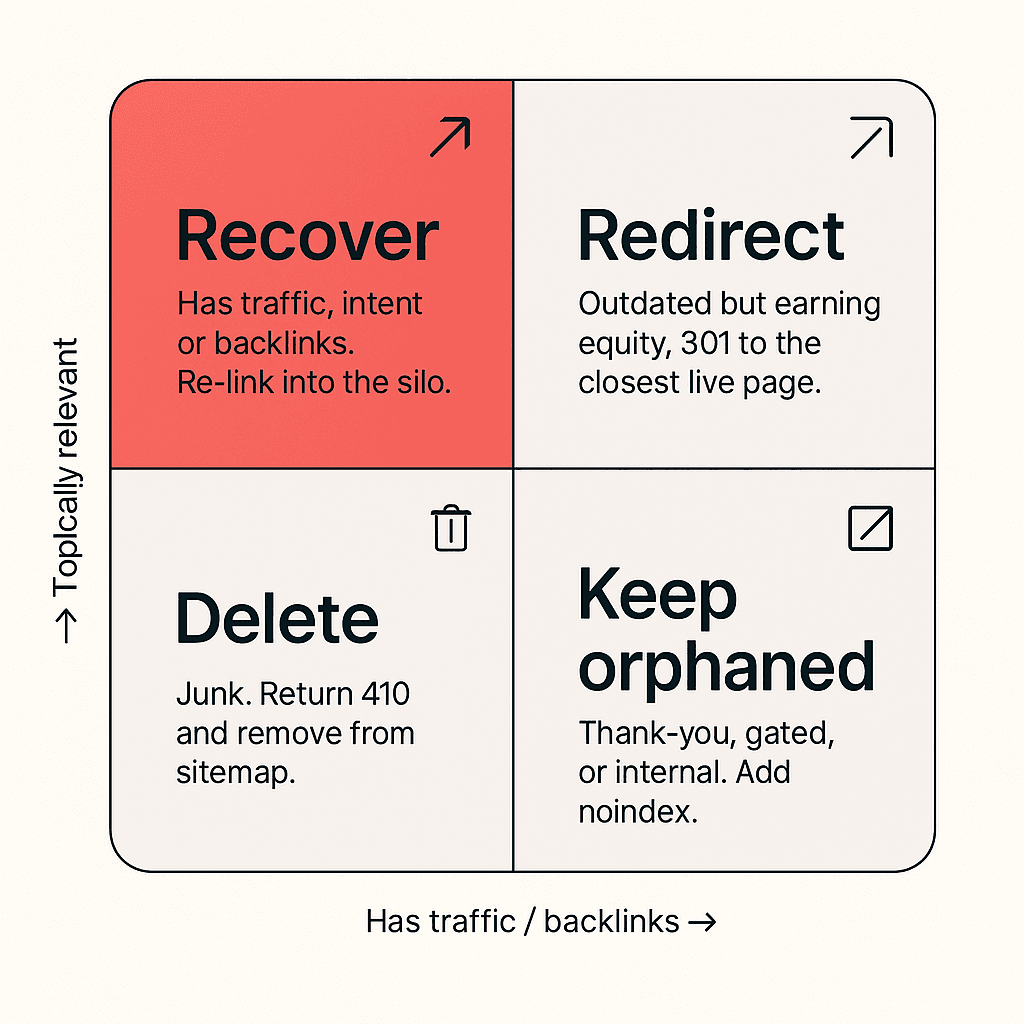
Every orphan needs a status decision. We use four categories:
Recover. The page has historical traffic, commercial intent, topical relevance to a current silo, or external backlinks. It belongs on the site and needs to be re-integrated through internal linking.
Redirect. The page is outdated, redundant, or thin, but has either historical traffic or external backlinks worth preserving. The right move is a 301 redirect to the most relevant live page.
Delete. The page is genuinely junk. No historical traffic, no backlinks, no topical relevance. Return a 410 Gone status and remove from sitemap.
Keep orphaned. The page is intentionally not linked from public pages: a thank-you page, a gated asset, a logged-in resource. Add a noindex tag if it is not already in place.
For the Recover and Redirect decisions, you need three data points per URL:
- Last 12 months of impressions from Search Console
- Last 12 months of organic sessions from GA4 or your analytics
- External backlinks from Ahrefs, Semrush, or Majestic
Pages with measurable activity on any of these three signals deserve to be recovered or carefully redirected. Pages with zero on all three are usually delete candidates.
We documented the analytics-and-search-data side of this audit in Why Your Blog Traffic Means Nothing And What To Track Instead, which is the lens we use when judging whether a page's historical performance is real signal or noise.
Step 5: Build the recovery linking plan
For every URL in the Recover bucket, you need three to five new internal links from relevant high-authority pages on your site.
The linking pattern that works:
- One link from the most relevant pillar page on the same topic
- Two to three links from related cluster posts that genuinely relate to the orphan's subject
- One link from a money page (service page, pricing page, case study) when the orphan supports a commercial intent
- One link from a recent post so the orphan benefits from the freshness signal of a current article
The anchor text matters. Use descriptive, non-exact-match anchor text that reflects how a human would refer to the page in context. Generic anchors ("click here," "this article") and exact-match anchors ("orphan page audit") both underperform compared to natural descriptive anchors.
For sites with very deep archives, this linking step is the most labor-intensive part of the audit. We use a spreadsheet that maps each orphan to its top 5 candidate source pages, then queue the edits as a sequence of pull requests or CMS updates.
Step 6: Execute the redirects and deletions
For URLs in the Redirect bucket, configure 301 redirects in your CMS, edge function, or hosting platform. Make sure each redirect points to a genuinely relevant live page, not a generic catch-all like the homepage. Generic redirects waste the equity you are trying to preserve.
For URLs in the Delete bucket, return a 410 Gone status. A 410 is more explicit than a 404 and tells Google to remove the URL from the index without ambiguity. Remove the URL from your sitemap in the same deploy.
After the deploy, re-submit the affected URLs to Search Console using the URL Inspection tool's "Request Indexing" function for the recovered pages, and resubmit the updated sitemap. This accelerates the re-evaluation cycle.
Step 7: Monitor recovery and prevent recurrence
Recovery happens on a measurable timeline:
- Days 1 to 14: Google re-crawls the recovered pages with the new internal links in place and updates its understanding of the page's context.
- Days 14 to 45: Impressions begin to lift on the recovered pages, often by 30 to 80 percent for pages that were previously ranking on page two or three.
- Days 45 to 90: Click recovery follows impression recovery as the rankings stabilize at higher positions.
- Months 3 to 6: Topical authority compounding kicks in, and the entire silo benefits from the cleaner internal architecture.

Track recovery using a saved Search Console comparison view: the recovered URL set, compared period-over-period from before the audit to 90 days after.
To prevent recurrence, install three habits:
- Quarterly orphan re-scan using the same crawl-versus-sitemap method
- Editorial requirement that no new page ships without at least three internal inbound links from existing relevant pages
- Migration discipline that any CMS, navigation, or category restructure includes an explicit internal link map review
A Worked Example: B2B SaaS Recovery
Here is a sanitized version of the recovery numbers from a recent client engagement, to make the framework concrete.
The site was a mid-stage B2B SaaS company with 487 indexable pages. The orphan audit surfaced 142 orphan candidates after the crawl-versus-sitemap comparison.
After triage:
- 76 URLs were marked Recover (historical impressions, commercial intent, or strong external backlinks)
- 38 URLs were marked Redirect (outdated content with backlinks, redirected to live equivalents)
- 22 URLs were marked Delete (junk pages, returned 410)
- 6 URLs were marked Keep Orphaned (thank-you pages, gated assets, given noindex)
The recovery linking work added 287 new internal links across 76 pages over a four-week sprint. Average inbound links per recovered page rose from 0 to 3.8.
Ninety days after deploy:
- Aggregate impressions across the recovered URL set rose by 64 percent
- Aggregate clicks rose by 47 percent
- Eleven pages that had been on page two or three moved to top 10 positions
- The site's topical authority signal in the relevant silo, measured as share of voice across the keyword universe, rose by 19 percent
The labor cost was roughly 60 hours of analyst and editorial time. The traffic delta translated to an estimated incremental pipeline of 1.4 crore INR over the following 12 months based on the client's standard attribution model.
This is a representative result, not an outlier. The mistake most teams make is assuming the lift requires new content. The lift came from architectural cleanup of pages that already existed.
Tools We Use for the Audit
You can run this audit with free or low-cost tooling. Our standard stack:
- Crawler: Screaming Frog SEO Spider or Sitebulb. JetOctopus or DeepCrawl for very large sites.
- Search data: Google Search Console (free), supplemented with the URL Inspection API for enterprise audits.
- Analytics: GA4, with a custom report for last-12-month sessions per landing page.
- Backlinks: Ahrefs Site Explorer or Semrush Backlink Analytics. Majestic for very large historical link profiles.
- Data joining: Google Sheets or Airtable for the triage spreadsheet. Python with pandas for sites above 5,000 URLs.
The crawler is the only mandatory paid tool. Everything else can be run with the free tier of the underlying platform on a small site.
For sites that need to do this at scale across multiple properties, the workaround for the post-num=100 SERP scraping changes is documented in No More num=100: How Smart SEOs Are Adapting to Google's New Data Limits, which affects how you pull SERP context for the recovery decisions.
Common Mistakes That Sabotage the Audit
The audits that fail to produce recovery typically make one of these mistakes:
Treating the orphan list as a delete list. Pages with historical traffic and commercial intent should almost always be recovered, not deleted. The fastest way to lose traffic from this audit is to over-prune.
Redirecting everything to the homepage. Generic redirects waste link equity. Every redirect should point to a specific, genuinely relevant live page.
Linking from low-relevance source pages. Adding internal links from unrelated posts to recovered orphans dilutes the topical signal. The point is contextual relevance, not link count.
Ignoring anchor text discipline. Recovered pages need descriptive anchor text that reinforces the topic, not generic "read more" links.
Skipping the freshness step. New internal links from current posts accelerate Google's re-evaluation. Linking only from old archive pages slows recovery.
Treating it as a one-off project. The site that needed this audit will need it again in 12 months. The fix is the maintenance habit, not the cleanup sprint.
These are the same architectural disciplines that make the difference between a site that ranks and one that gets outranked by less-funded competitors, which we covered from a different angle in The Dark Side of Authority Sites and How to Beat Them.
How This Connects to AI Search Visibility
A point that surprised some of our clients in the last 12 months: orphan recovery has a measurable impact on AI answer engine citation rates.
The reasoning, when you trace it through, is structural. AI engines like ChatGPT, Perplexity, Gemini, and the AI Overviews layer in Google all weight source selection by perceived authority. Authority is a composite signal that includes external citation patterns, schema markup, author signals, and the source page's relationship to the rest of its own domain.
A page that nothing on its own domain links to fails the most basic confidence check. The model treats a structurally isolated page as a weaker source than a page embedded in a coherent topical silo, even when the content quality is identical.
We have measured this on three client sites in 2026. After running the orphan recovery audit, AI citations across the recovered URL set rose by 28 to 71 percent within 90 days. The pages did not change. The internal context around them did.
This is the same mechanism we discussed in Intent-First SEO: Optimizing for AI's Understanding of Why, Not Just What and is one of the strongest reasons to prioritize this audit even on sites where Google rankings appear stable.
When to Run the Audit
The triggers that should prompt an immediate orphan audit:
- Site has been through a CMS migration in the last 12 months
- Site has been through a navigation redesign or category restructure
- Site has run any programmatic SEO push without an internal linking layer
- Aggregate organic traffic is flat or declining despite ongoing publishing
- Search Console shows a growing gap between "Indexed" and "Not Indexed" URLs
- AI answer engine citations are below expectations for the content quality
- The site has more than 200 pages and has never had a formal architectural audit
For sites that hit two or more of these triggers, the audit usually pays for itself within 90 days through recovered traffic alone.
Where Orphan Recovery Sits in a Broader SEO Program
Orphan recovery is a high-leverage tactical project, but it works best as one component of a broader site architecture program.
The sequence we run for clients:
- Orphan audit and recovery. This piece. The fastest impression and ranking gains.
- Internal linking architecture. Building a deliberate hub-and-spoke topology across the site, covered in our Topical Authority framework.
- Schema and entity layer. Reinforcing the architectural signal with structured data, covered in Schema Markup Secrets: Boosting CTR and Visibility With Rich Snippets.
- Authority link acquisition. External link building that compounds the now-cleaner architecture, where we work with clients through our link building services and digital PR services.
- Programmatic expansion. Once the architecture is clean, scaling content production through templated programs that respect the linking discipline.
Running these out of sequence is wasteful. Building backlinks to an architecturally broken site dilutes the equity. Publishing programmatic templates on top of an orphan-prone architecture multiplies the problem.
The audit in this piece is the foundation step. Everything downstream depends on it being done well.
The Bottom Line
The most underrated traffic source on most websites is the content the site already published. Pages that ranked, that converted, that earned backlinks, and that quietly got disconnected from the rest of the site as the architecture evolved.
Recovering those pages is faster, cheaper, and higher-leverage than producing new content. The audit takes one to two days. The cleanup takes two to four weeks. The traffic recovery shows up in 90 days.
If your site is more than two years old, has more than 200 indexable pages, or has been through any structural change in the last 12 months, the orphan audit is the highest-ROI technical SEO project you can run this quarter.
If you would like our team to run the audit on your site, surface the recovery list, and execute the linking sprint, get in touch with us and we will scope the project against your specific site size and content history. For broader engagements, our full SEO services and enterprise SEO services include this audit as a foundational step.
The pages are already there. The traffic is already earned. The recovery is mostly a question of whether you choose to do the work.

Aditya Kathotia
Founder & CEO
CEO of Nico Digital and founder of Digital Polo, Aditya Kathotia is a trailblazer in digital marketing. He's powered 500+ brands through transformative strategies, enabling clients worldwide to grow revenue exponentially. Aditya's work has been featured on Entrepreneur, Economic Times, Hubspot, Business.com, Clutch, and more. Join Aditya Kathotia's orbit on LinkedIn to gain exclusive access to his treasure trove of niche-specific marketing secrets and insights.