

The bottleneck in most YouTube channels is not ideas. It is production capacity.
A creator with a good concept, a decent camera, and no team still faces the same pipeline: scripting, recording, editing, thumbnails, titles, metadata, publishing, and then doing it again five days later. That cycle grinds people down, and most channels that die do not die from lack of talent. They die from operational exhaustion.
AI tools do not solve the creativity problem. That is still yours to own. What they do is compress the production timeline on everything surrounding the creative work, which means more output, higher consistency, and a lot less time spent on tasks that should not require your full attention in the first place.
This is a practical breakdown of where AI actually fits into a YouTube workflow in 2026, which tools are worth using, where the limits are, and what a channel that runs AI-assisted production looks like in practice.

What AI Can and Cannot Do for a YouTube Channel
The honest framing first, because the hype in this category runs hot.
AI can generate first-draft scripts from a topic prompt. It cannot replace a creator's voice, point of view, or on-camera presence. The output from language models like GPT-4 is a functional scaffold, not a finished script. Every sentence that sounds like a chatbot rather than a human will cost you watch time, and viewers notice faster than most creators expect.
AI can suggest titles, thumbnails, and metadata based on pattern recognition across high-performing content. It cannot guarantee virality, predict trends, or substitute for a genuine understanding of your specific audience.
AI can dramatically accelerate editing by auto-generating captions, removing silences, color correcting, and cutting rough footage. It cannot make a poorly filmed video look well-produced, and it cannot fix a weak hook in the first thirty seconds of a video, which is where most viewership is lost.
With those constraints understood, here is where AI genuinely earns its place.

AI Tool Pricing: Free vs. Paid for Indian Creators
Indian creators operate on tighter budget constraints than their Western counterparts, and pricing is a meaningful selection criterion. Here is a practical breakdown:
| Tool | Free Tier? | Paid Starting Price | Best For |
|---|---|---|---|
| ChatGPT | Yes (GPT-3.5) | ~₹1,700/month (GPT-4) | Scripting, outlines |
| CapCut | Yes | Free (with watermark on some features) | Editing, Shorts |
| Canva | Yes | ~₹3,900/year | Thumbnails, graphics |
| Descript | Limited | ~₹1,000/month | Transcription, captions |
| TubeBuddy | Limited | ~₹800/month | Metadata, keyword research |
| VidIQ | Limited | ~₹700/month | Analytics, Shorts |
| Stable Diffusion | Free (self-hosted) | Free or cloud costs | Thumbnail image gen |
| Runway ML | Limited | ~₹1,500/month | Video generation, editing |
For creators starting out, the free tier stack (ChatGPT + CapCut + Canva + TubeBuddy free) covers the most critical workflow needs at zero cost.
Scripting and Research: Where AI Saves the Most Time
Research is a part of content creation that used to take hours. Finding credible sources, cross-referencing information, structuring arguments, and building a coherent narrative from scattered inputs was - before large language models - a genuinely time-consuming process.
That time cost has collapsed.
ChatGPT and GPT-4 (OpenAI) are the most capable general-purpose language models for scripting work. The workflow that works best is not "generate me a script about X." It is iterative:
- start with an outline request,
- push back on weak sections,
- ask for alternative framings of the hook,
- refine line by line.
Treating the model as a collaborative editor rather than a vending machine produces substantially better output.
For research-heavy content, the combination of web-browsing-enabled language models and your own source verification is the current best practice. Use AI to surface and organize information, then verify claims against primary sources before you script them. Your credibility with an audience is not worth the time saved by skipping that step.
InVideo is worth highlighting for Indian creators specifically. It is one of the most popular AI video creation tools in India, allowing creators to generate video content from text scripts with a library of stock footage, voiceovers, and editing features. It is particularly well-suited for educational and explainer content where you do not need on-camera presence.
Snazzy AI is a lighter-weight option focused specifically on short-form script generation and content ideation - useful for rapid concept development and title brainstorming.
Common mistake: Using AI-generated scripts verbatim without editing for your voice. The tell is in the cadence. AI writes in a rhythm that is slightly too even, slightly too complete. Real conversational speech has interruptions, incomplete thoughts, and personality. Edit accordingly.
Video Generation and Visual Creation
The text-to-video and image generation space has moved faster than any other AI category over the past two years. The tools here are genuinely impressive in capability and genuinely limited in practical application for most channels.
HuggingFace ModelScope generates short video clips from text prompts. The output quality is improving but still falls short of what most production-value channels would use as primary footage. Where it works well is supplemental B-roll for faceless educational channels, conceptual visualizations, and stylized sequences where realistic footage is not the goal.
Runway ML is the most capable end-to-end AI video platform currently accessible to independent creators. Its Gen-2 model supports text-to-video and video-to-video generation with reasonable quality for specific use cases. It also offers a suite of editing tools - background removal for scripting scenes and motion tracking - which compress tasks traditionally requiring specialized software.
Stable Diffusion (and hosted versions like DreamStudio) remains the most practical image generation tool for YouTube creators who need thumbnails, custom illustrations, or concept art. The quality ceiling is high, the iteration speed is fast, and with practice, you can produce thumbnail concepts in minutes that would take hours with a designer working from scratch. For Indian creators, the free self-hosted version is viable if you have a capable computer; cloud-based versions cost a few rupees per image.
A note on thumbnail generation specifically: AI image generation is a starting point, not a finished product. Effective YouTube thumbnails follow reliable psychological principles - contrast, facial expression, text placement, and visual hierarchy - which require intentional compositional choices on top of whatever the model generates.
Animaker is worth mentioning for creators in the animation and explainer video space. It simplifies the production of animated sequences significantly, though its output has a recognizable aesthetic that may or may not suit your brand positioning.
Video Editing: Where AI Has Changed the Workflow
This is the area with the most mature AI tooling and the most immediate return for most channels.
Adobe Premiere Pro with Adobe Sensei integrates AI across the editing workflow in ways that are now genuinely production-grade. Sensei-powered features include automated captions, scene detection, intelligent reframing for multi-format export, audio cleanup that removes background noise and room tone without manual equalization, and color matching across clips.
For creators already inside the Adobe ecosystem, these features are not experimental additions. They are part of a standard workflow that meaningfully reduces editing time per video.
CapCut deserves its own section for Indian creators. It is free, widely available in India, and has integrated several AI features that are genuinely useful at the independent creator level: auto-captions in multiple Indian languages, noise removal, background removal, auto-cut to beat, and smart cropping for different aspect ratios. For creators at an early stage who need lighter-weight tooling than Adobe, CapCut is the most practical AI-integrated editing option available.
Runway ML doubles here as well. Its editing capabilities - particularly background removal and scene-consistent visual effects - are useful at the independent creator level without requiring a compositing background.
Lumen5 occupies a specific niche: turning written content - blog posts, articles, and newsletters - into video format. For creators who already produce written content and want to repurpose it for YouTube without additional filming, it is an efficient conversion path. The output is better suited to informational and educational content than entertainment channels.
Common mistake: Over-relying on AI audio cleanup to fix fundamentally poor recording conditions. A cheap, well-positioned microphone in a treated room will always outperform an expensive microphone with heavy AI processing in an acoustically bad space. Get the source right first.
YouTube Shorts: AI Tools for the Short-Form Format
YouTube Shorts is one of the fastest-growing content formats on the platform and is entirely different in production and strategy from long-form content. Indian creators have been particularly active in the Shorts ecosystem.
CapCut is the dominant tool for Shorts production among Indian creators - free, fast, and optimized for vertical video with AI features built in.
For Shorts scripts: ChatGPT prompts for 45-60 second scripts work well when you specify the constraint upfront. Prompt: "Write a 55-second script for a YouTube Short about [topic] targeting [audience]. Start with a hook in the first 3 seconds that poses a question or challenge. Include one concrete takeaway. End with a reason to follow the channel."
For Shorts metadata: VidIQ has a dedicated Shorts analytics feature that shows trending topics and keyword opportunities specifically in the under-60-second format.
For Shorts captions: Auto-captioning is more important for Shorts than for long-form content since Shorts are frequently watched without sound. Descript and CapCut both generate captions automatically that can be styled and synchronized quickly.
Analytics, Optimization, and Audience Intelligence
Understanding what your audience is watching, where they drop off, and what content is performing in your category is work that scales beyond what manual analysis can handle.
YouTube's native analytics, which has become increasingly AI-driven, surfaces audience retention curves, suggested traffic sources, and comparison benchmarks that are directly actionable. Before investing in third-party analytics tooling, make sure you are actually using what the platform already provides.
For keyword research and content gap analysis, tools like TubeBuddy and VidIQ layer AI-assisted opportunity identification on top of YouTube data. They are not AI tools in the generative sense, but they apply machine learning to surface title optimization, tag suggestions, and competitive positioning analysis that would take significantly longer to do manually. Integrating these with broader content marketing services ensures your video metadata aligns with the same keyword strategy driving your written content.
Voiceover and Narration: What Works and What Does Not
Text-to-speech technology has improved substantially. The gap between AI-generated voices and competent human narration has narrowed, but it has not closed - particularly for longer-form content where emotional range and pacing variety matter.
Synthesia is among the better tools for AI voice generation paired with AI avatar presentation. It works best for corporate training content, explainer videos, and multilingual content where producing separate recordings per language is impractical. For Hindi-language content, Synthesia's Hindi voice options have improved significantly and are now viable for educational channels where informational clarity matters more than vocal personality.
For creators running faceless educational channels where the content is the value rather than the presenter, AI voiceover is a legitimate production option. The practical test: Play your AI-narrated video to someone who does not know it is AI-generated. If they notice before you tell them, it needs more work.
Building a Faceless Channel With AI Production
Faceless channels - where no on-camera presenter appears and the value is entirely content-based - are one of the more sustainable AI-assisted formats available. They remove the single largest barrier to consistent publishing, which is the need to film, appear presentable, and manage the personal brand anxiety that derails many creators.
The viable models for AI-assisted faceless content include:
- documentary-style educational videos using licensed stock footage plus AI narration,
- animated explainer content using tools like Animaker or InVideo,
- screen-recorded tutorial content with AI voiceover, and
- text-to-video content using Lumen5 or similar platforms.
The commercial viability of these formats depends on niche selection. Finance, productivity, history, science, and business content perform well in faceless formats because the audience is there for the information, not the presenter. Entertainment niches where parasocial connection is the product are harder to build without a face.
On monetization: AI-generated content is not automatically disqualified from YouTube's Partner Program. YouTube's monetization policies focus on content originality, value to viewers, and adherence to community guidelines - not production method. AI-assisted content that meets those standards is eligible.
A Realistic Production Stack
For a solo creator or small team looking to run a sustainable AI-assisted YouTube operation, the practical toolset does not need to be comprehensive. It needs to be strategic.
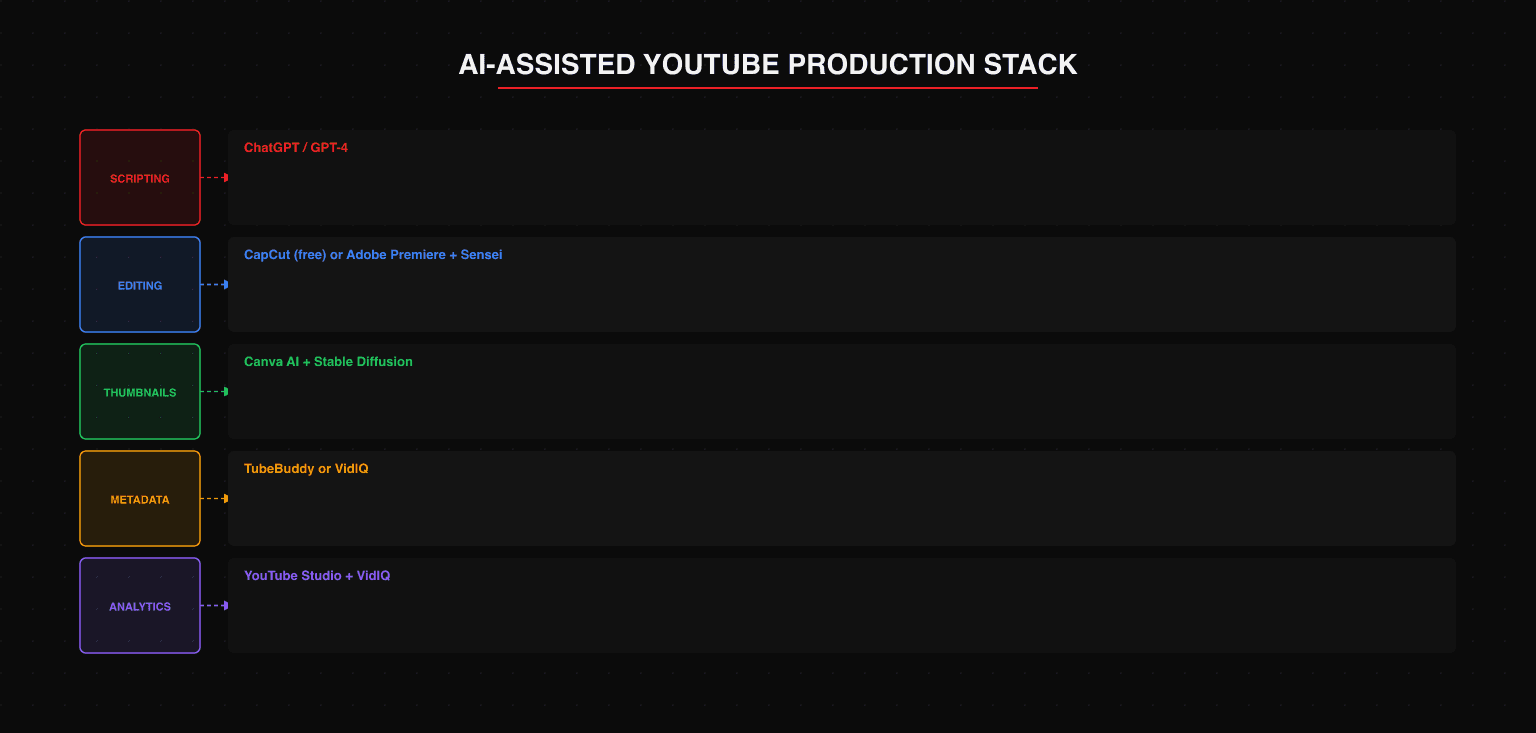
A workable starting stack for most channels:
Scripting and research: GPT-4 for drafting and iteration, primary sources for verification.
Editing: Adobe Premiere Pro with Sensei for established workflows, or CapCut for creators at an earlier stage who need lighter-weight, free tooling.
Thumbnails: Stable Diffusion or Canva AI for image generation, Canva for composition and text overlay.
Metadata and optimization: TubeBuddy or VidIQ for title testing and keyword analysis. A clear video SEO strategy ensures your titles, descriptions, and tags are built around search demand rather than guesswork.
Transcription and captions: Descript for automated transcription and caption generation, which also doubles as a text-based video editing environment.
YouTube Shorts: CapCut for production, VidIQ for keyword research.
Start with one workflow problem that costs you the most time per video and solve that first. Adding tools progressively - with a clear assessment of whether each one actually reduces time or just adds complexity - will serve you better than building an elaborate stack before you know where the real bottlenecks are.
The Consistent Channel Over the Viral One
The channels that compound on YouTube are not the ones with the best individual videos. They are the ones that publish consistently, improve incrementally, and retain audience across a long arc of content. For brands treating YouTube as part of a wider social media marketing India strategy, that consistency becomes a compounding asset across every platform simultaneously.
AI tools are meaningful for that goal because consistency requires sustainable operations. A production workflow that burns out a creator after sixty videos is a failed workflow, regardless of how good the content quality was.
If AI compresses the time cost enough that you can maintain a publishing cadence without sacrificing the quality of the creative work itself, that is where the real return is.
The creative decisions - the framing, the perspective, the things that make a channel worth watching - still belong to you. The production infrastructure around those decisions is where AI earns its keep.
Frequently Asked Questions
What is the best free AI tool for YouTube creators in India?
For scripting, ChatGPT's free tier is capable for outlines and first drafts. For editing, CapCut is free and widely used by Indian creators - it has integrated AI features for auto-captions, noise removal, and basic effects. For thumbnails, Canva's free tier with its AI generation tools is a practical starting point. For metadata and keyword research, TubeBuddy and VidIQ both offer free tiers with limited but useful features.
Can AI-generated content on YouTube be monetized?
Yes, with conditions. YouTube's monetization policies focus on content originality, value to viewers, and adherence to community guidelines - not production method. AI-assisted content that meets those standards is eligible for the YouTube Partner Program. Channels that use AI to mass-produce low-effort, repetitive, or misleading content are at risk of monetization removal or channel termination regardless of AI involvement.
What AI tools work best for YouTube Shorts?
For YouTube Shorts, the tools that matter most are those that compress vertical-format production: CapCut for vertical editing and effects, Canva for Shorts thumbnail creation, and ChatGPT for generating tight 60-second scripts. Descript is useful for auto-captioning Shorts, which is important since most Shorts are watched without sound. For Shorts-specific keyword research, VidIQ has a dedicated Shorts analytics feature that shows which keywords are trending in the sub-60-second format.
How much do AI YouTube tools cost per month?
The free stack (ChatGPT free + CapCut + Canva free + TubeBuddy free) covers essential needs at zero cost. A basic paid stack (ChatGPT Plus + CapCut + Canva Pro + TubeBuddy basic) runs approximately ₹6,000-₹8,000 per month. A full professional stack adding Descript, Runway ML, and a premium analytics tool would run ₹15,000-₹25,000 per month. Most independent Indian creators operate effectively on the free or basic paid tier.
Is Descript available in India and does it support Hindi?
Descript is available globally including India. Its transcription accuracy for Hindi is improving but is not yet at the same quality level as English transcription. For Hindi-language content, CapCut's auto-captions in Hindi tend to produce better results for short-form content, while Descript is more reliable for English and bilingual (Hinglish) content. For fully Hindi-language channels, manually reviewing and correcting AI-generated captions is currently a necessary step.
Building a YouTube strategy but not sure which AI tools fit your workflow? We'll assess your current setup and identify which tools will save you the most time at your specific production stage. Book a YouTube content strategy review →

Aditya Kathotia
Founder & CEO
CEO of Nico Digital and founder of Digital Polo, Aditya Kathotia is a trailblazer in digital marketing. He's powered 500+ brands through transformative strategies, enabling clients worldwide to grow revenue exponentially. Aditya's work has been featured on Entrepreneur, Economic Times, Hubspot, Business.com, Clutch, and more. Join Aditya Kathotia's orbit on LinkedIn to gain exclusive access to his treasure trove of niche-specific marketing secrets and insights.